

- Posts: 40
Need testers for USBcode
- BitOne
-
- Offline
Less
More
12 Aug 2013 08:36 #12917
by BitOne
Replied by BitOne on topic Need testers for USBcode
Hey Jb57,
Why don't you try with a Linux LiveCD or a Linux bootable USB key ? This way you could use Phractured Blue's program to update your TX.
It's pretty simple:
- install the following program:
httpb://www.pendrivelinux.com/universal-usb-installer-easy-as-1-2-3/
- choose the last Mint Linux Distribution
- install it on a USB key (be careful, the content of the USB key will be removed)
- boot from the USB key
- download Deviation
- download Phractured Blue program
- open a terminal
- switch to root (sudo -s)
- connect your TX with the USB cable
- launch PB's program (java -jar <pbprogram) following the instructions provided by PB's
- and voilà
Why don't you try with a Linux LiveCD or a Linux bootable USB key ? This way you could use Phractured Blue's program to update your TX.
It's pretty simple:
- install the following program:
httpb://www.pendrivelinux.com/universal-usb-installer-easy-as-1-2-3/
- choose the last Mint Linux Distribution
- install it on a USB key (be careful, the content of the USB key will be removed)
- boot from the USB key
- download Deviation
- download Phractured Blue program
- open a terminal
- switch to root (sudo -s)
- connect your TX with the USB cable
- launch PB's program (java -jar <pbprogram) following the instructions provided by PB's
- and voilà
- PhracturedBlue
-
Topic Author
- Offline
Less
More
- Posts: 4403
12 Aug 2013 13:58 #12926
by PhracturedBlue
Replied by PhracturedBlue on topic Need testers for USBcode
You CAN use my program with Windows. It is not even that hard. Here are the instructions:
1) uninstall DFuSe
2) Download Zadig from here: sourceforge.net/projects/libwdi/files/zadig/
3) Plug in your Tx and turn it on in programming mode
4) Run Zodig (as Administrator) select the device, select 'libusb-win32' and select 'Install'
5) Start a cmd shell as Administrator
6) Make sure you have the proper version of Java installed (64bit java for 64bit OS)
7) Follow the instructions here to test and run: www.deviationtx.com/forum/7-development/...ers-for-usbcode#9489
If you ever want to go back to DFuse, you must remove the driver (Device Manager->USB->...) before installing DFuse
1) uninstall DFuSe
2) Download Zadig from here: sourceforge.net/projects/libwdi/files/zadig/
3) Plug in your Tx and turn it on in programming mode
4) Run Zodig (as Administrator) select the device, select 'libusb-win32' and select 'Install'
5) Start a cmd shell as Administrator
6) Make sure you have the proper version of Java installed (64bit java for 64bit OS)
7) Follow the instructions here to test and run: www.deviationtx.com/forum/7-development/...ers-for-usbcode#9489
If you ever want to go back to DFuse, you must remove the driver (Device Manager->USB->...) before installing DFuse
- BitOne
-
- Offline
Less
More
- Posts: 40
13 Aug 2013 07:35 #12940
by BitOne
Replied by BitOne on topic Need testers for USBcode
Hey Phractured Blue,
Thanks for the info, didn't know that.
It's even easier than what I described !
Thanks for the info, didn't know that.
It's even easier than what I described !
- jb57
-
- Offline

Less
More
- Posts: 4
21 Aug 2013 12:37 - 21 Aug 2013 12:40 #13099
by jb57
Replied by jb57 on topic Need testers for USBcode
PhracturedBlue
As per your and BitOne's instructions. Is this the jar file that I should be using: www.deviationtx.com/media/kunena/attachm...ith-dependencies.zip ? Are there any other downloads that I need before doing the firmware update?
As per your and BitOne's instructions. Is this the jar file that I should be using: www.deviationtx.com/media/kunena/attachm...ith-dependencies.zip ? Are there any other downloads that I need before doing the firmware update?
Last edit: 21 Aug 2013 12:40 by jb57. Reason: added link address
- HappyHarry
-
- Offline

Less
More
- Posts: 1136
22 Jan 2014 14:39 - 22 Jan 2014 14:41 #18919
by HappyHarry
Replied by HappyHarry on topic Need testers for USBcode
i've been trying to get this working, but it keeps falling over,
any suggestions on how to get this working?
thanks in advance
phil@dv2:~/Downloads$ java -jar DeviationUpload-0.5-jar-with-dependencies.jar -list
Found: Runtime [003f0:171d] cfg=1, intf=3, alt=0, name='Unknown'
Found: DFU [00483:df11] cfg=1, intf=0, alt=0, name='Unknown'
Found: DFU [00483:df11] cfg=1, intf=0, alt=1, name='Unknown'
Found: DFU [00483:df11] cfg=1, intf=0, alt=2, name='Unknown'
phil@dv2:~/Downloads$ java -jar DeviationUpload-0.5-jar-with-dependencies.jar -send -dfu ~/MyDeviation/builds/newest-deviation-devo7e-v4.0.1-7a32ad9/deviation-devo7e-v4.0.1-7a32ad9.dfu
Found: Runtime [003f0:171d] cfg=1, intf=3, alt=0, name='Unknown'
Found: DFU [00483:df11] cfg=1, intf=0, alt=0, name='Unknown'
Found: DFU [00483:df11] cfg=1, intf=0, alt=1, name='Unknown'
Found: DFU [00483:df11] cfg=1, intf=0, alt=2, name='Unknown'
Error: Did not find matching device for VID:0x483 PID:0xdf11 alt:0
phil@dv2:~/Downloads$
any suggestions on how to get this working?
thanks in advance
Last edit: 22 Jan 2014 14:41 by HappyHarry.
- linux-user
-
- Offline

Less
More
- Posts: 271
22 Jan 2014 15:19 - 22 Jan 2014 15:26 #18922
by linux-user
Replied by linux-user on topic Need testers for USBcode
You may need root privileges.
I just did a quick test (at the moment I don't want to flash my TX):
I just did a quick test (at the moment I don't want to flash my TX):
manfred@elsi:~> java  -jar DeviationUpload-0.5-jar-with-dependencies.jar -l
Found: DFU [00483:df11] cfg=1, intf=0, alt=0, name='Unknown'
Found: DFU [00483:df11] cfg=1, intf=0, alt=1, name='Unknown'
Found: DFU [00483:df11] cfg=1, intf=0, alt=2, name='Unknown'

manfred@elsi:~> sudo java  -jar DeviationUpload-0.5-jar-with-dependencies.jar -l
Found: DFU [00483:df11] cfg=1, intf=0, alt=0, name='@Internal Flash  '
Found: DFU [00483:df11] cfg=1, intf=0, alt=1, name='@SPI Flash: Config'
Found: DFU [00483:df11] cfg=1, intf=0, alt=2, name='@SPI Flash: Library'
Last edit: 22 Jan 2014 15:26 by linux-user.
- cstratton
-
- Offline

Less
More
- Posts: 46
22 Jan 2014 16:11 - 22 Jan 2014 16:12 #18923
by cstratton
Replied by cstratton on topic Need testers for USBcode
I believe linux libusb clients can find devices they don't have privilege to, they just can't use them.
To me the error message looks more like the device is not connected or not in DFU mode.
First step in debugging would be to run lsusb and see if something with that VID & PID shows up, or if not that, what combination does show up when the TX is plugged in and allegedly in DFU mode. If nothing shows up, run dmesg and look for error messages about a misbehaving USB device.
Incidentally, the preferred solution to the USB device permission issue is a udev rule granting unprivileged users access to that specific device. Examples can be found in the Android SDK adb setup docs, the stlink project, etc.
To me the error message looks more like the device is not connected or not in DFU mode.
First step in debugging would be to run lsusb and see if something with that VID & PID shows up, or if not that, what combination does show up when the TX is plugged in and allegedly in DFU mode. If nothing shows up, run dmesg and look for error messages about a misbehaving USB device.
Incidentally, the preferred solution to the USB device permission issue is a udev rule granting unprivileged users access to that specific device. Examples can be found in the Android SDK adb setup docs, the stlink project, etc.
Last edit: 22 Jan 2014 16:12 by cstratton.
- HappyHarry
-
- Offline
Less
More
- Posts: 1136
22 Jan 2014 17:26 #18925
by HappyHarry
that was it bud, thanks
as i posted above it was a permissions issue, also the device is clearly there and connected in DFU mode, the three DFU devices found after the list command clearly show this
i've used udev rules before to create specific permanent nodes for specific flash drives so i can use scripts for transferring data without having to worry about what device node (sda, sdb etc) each one gets allocated when plugged in and it's a very powerful thing. so i'll look to use it to set the permissions correctly for the 7e, thanks
Replied by HappyHarry on topic Need testers for USBcode
linux-user wrote: You may need root privileges.
that was it bud, thanks
cstratton wrote: I believe linux libusb clients can find devices they don't have privilege to, they just can't use them.
To me the error message looks more like the device is not connected or not in DFU mode.
as i posted above it was a permissions issue, also the device is clearly there and connected in DFU mode, the three DFU devices found after the list command clearly show this
i've used udev rules before to create specific permanent nodes for specific flash drives so i can use scripts for transferring data without having to worry about what device node (sda, sdb etc) each one gets allocated when plugged in and it's a very powerful thing. so i'll look to use it to set the permissions correctly for the 7e, thanks
- PhracturedBlue
-
- Offline
Less
More
- Posts: 4403
22 Jan 2014 18:00 #18927
by PhracturedBlue
Replied by PhracturedBlue on topic Need testers for USBcode
When I get back to working on this utility, I'll release udev rules (though if someone wants to make them for me, that'd be cool). I haven't had time to touch this code in a long time. My ambitions were much greater than the time I had available.
- cstratton
-
- Offline
Less
More
- Posts: 46
22 Jan 2014 21:14 - 22 Jan 2014 21:15 #18941
by cstratton
Replied by cstratton on topic Need testers for USBcode
Cribbing from the Android docs, it would probably be this (untested)
All steps must be performed as root; thereafter normal users should have access
1. Create the file /etc/udev/rules.d/51-deviation.rules with the following content:
SUBSYSTEM=="usb", ATTR{idVendor}=="0483", MODE="0666", GROUP="plugdev"
2) chmod a+r /etc/udev/rules.d/51-deviation.rules
3) Inform the running udev of your changes. This may be a command such as 'sudo udevadm control --reload-rules' though rebooting works too.
- If the transmitter was already plugged in, it would probably have to be re-plugged at this point.
- Someone doing development with an stlink adapter may not want the global rule for all ST devices, as at least the stlink open source project has its own rule that also creates a symlink - not sure if that is used, but it might be worth modeling a PID-specific rule on the stlink project one instead in that case:
SUBSYSTEM=="usb", ATTR{idVendor}=="0483", ATTRS{idProduct}=="df11", MODE="0666", GROUP="plugdev"
All steps must be performed as root; thereafter normal users should have access
1. Create the file /etc/udev/rules.d/51-deviation.rules with the following content:
SUBSYSTEM=="usb", ATTR{idVendor}=="0483", MODE="0666", GROUP="plugdev"
2) chmod a+r /etc/udev/rules.d/51-deviation.rules
3) Inform the running udev of your changes. This may be a command such as 'sudo udevadm control --reload-rules' though rebooting works too.
- If the transmitter was already plugged in, it would probably have to be re-plugged at this point.
- Someone doing development with an stlink adapter may not want the global rule for all ST devices, as at least the stlink open source project has its own rule that also creates a symlink - not sure if that is used, but it might be worth modeling a PID-specific rule on the stlink project one instead in that case:
SUBSYSTEM=="usb", ATTR{idVendor}=="0483", ATTRS{idProduct}=="df11", MODE="0666", GROUP="plugdev"
Last edit: 22 Jan 2014 21:15 by cstratton.
- Schugy
-
- Offline

Less
More
- Posts: 37
22 Aug 2014 09:35 #25345
by Schugy
Replied by Schugy on topic Need testers for USBcode
Ver. 0.5 + Linux worked great. Thank you for your efforts.
- PhracturedBlue
-
- Offline
Less
More
- Posts: 4403
20 Apr 2015 03:46 - 20 Apr 2015 03:49 #31397
by PhracturedBlue
Replied by PhracturedBlue on topic Need testers for USBcode
After seeing several posts about users installing the wrong firmware on their transmitters, I decided to dust off my Uploader code and try to finish it.
Here is version 0.6. this is the 1st version with a functional GUI.
Features:
These things have not yet been tested:
Uploading Walkera official firmware zip files
Uploading to the Devo12
Detection of Devo F12, F12E, 12E, or F7 transmitters (I would be interested in how these transmitters show up on the screen but DO NOT try to install a dfu or zip on any of these transmitters!)
I would be really interested in anyone who could provide feedback on using it either usability, or bugs. I intend to make this the officially supported upload method for Deviation in the next release, so getting testing in would be really valuable.
NOTE: It should not be possible to irreversibly harm our transmitter using this software, but you need to ensure you have a known-good dfu file to install in case you need to go back to the Walkera DFuse installer.
This software does require that Java be installed, but should have no other dependencies. In Linux you must ensure you have USB permissions or run as root.
Here is version 0.6. this is the 1st version with a functional GUI.
Features:
- It can upload zip files containing separate firmware and libraries, or the new format zip files that include both firmware and libraries (you don't need to go into the fiesystem mode after updating the dfu anymore)
- You can select whether to overwrite your tx.ini, hardware.ini, or models.
- It can format your drive for you
- It still supports DFU files if desired
- It will not allow you to upload firmware not intended for your transmitter
- cmdline mode is still available
These things have not yet been tested:
Uploading Walkera official firmware zip files
Uploading to the Devo12
Detection of Devo F12, F12E, 12E, or F7 transmitters (I would be interested in how these transmitters show up on the screen but DO NOT try to install a dfu or zip on any of these transmitters!)
I would be really interested in anyone who could provide feedback on using it either usability, or bugs. I intend to make this the officially supported upload method for Deviation in the next release, so getting testing in would be really valuable.
NOTE: It should not be possible to irreversibly harm our transmitter using this software, but you need to ensure you have a known-good dfu file to install in case you need to go back to the Walkera DFuse installer.
This software does require that Java be installed, but should have no other dependencies. In Linux you must ensure you have USB permissions or run as root.
Last edit: 20 Apr 2015 03:49 by PhracturedBlue.
- mwm
-
- Offline

20 Apr 2015 06:21 #31401
by mwm
Do not ask me questions via PM. Ask in the forums, where I'll answer if I can.
My remotely piloted vehicle ("drone") is a yacht.
Replied by mwm on topic Need testers for USBcode
Doesn't seem to work on either my Unix box or the Linux VM running on it. On the Unix box, it does nothing. On the Linux VM, it opens a window but never renders anything into it.
I had to install Java on the Windows VM, but that at least seems to work. Is there a minimal version of Java required?
I had to install Java on the Windows VM, but that at least seems to work. Is there a minimal version of Java required?
Do not ask me questions via PM. Ask in the forums, where I'll answer if I can.
My remotely piloted vehicle ("drone") is a yacht.
- PhracturedBlue
-
- Offline
Less
More
- Posts: 4403
20 Apr 2015 13:12 #31413
by PhracturedBlue
Replied by PhracturedBlue on topic Need testers for USBcode
It will only work on Linux, Windows and OSX. It do not think it will work on a BSD machine (though I don't have one to try). It should work fine on Linux since that is where I developed it (Ubuntu 14.04). On linux try running:
java -jar deviation-uploader-0.6.jar -h
and if that works, try:
java -jar deviation-uploader-0.6.jar -l
My Java version says:
java -version
java version "1.7.0_75"
OpenJDK Runtime Environment (IcedTea 2.5.4) (7u75-2.5.4-1~trusty1)
OpenJDK 64-Bit Server VM (build 24.75-b04, mixed mode)
But I don't expect it to matter much which version you have. I don't use any new-fangled capabilities I think.
java -jar deviation-uploader-0.6.jar -h
and if that works, try:
java -jar deviation-uploader-0.6.jar -l
My Java version says:
java -version
java version "1.7.0_75"
OpenJDK Runtime Environment (IcedTea 2.5.4) (7u75-2.5.4-1~trusty1)
OpenJDK 64-Bit Server VM (build 24.75-b04, mixed mode)
But I don't expect it to matter much which version you have. I don't use any new-fangled capabilities I think.
- PhracturedBlue
-
- Offline
Less
More
- Posts: 4403
20 Apr 2015 14:08 - 20 Apr 2015 14:09 #31419
by PhracturedBlue
Replied by PhracturedBlue on topic Need testers for USBcode
I forgot to add that on Windows to actually get USB working, youneed to replace the STMicro USB driver with the lib-usb one. That may make it a hard-sell, even if it is pretty easy to go back and forth.
In windows I do:
To go back, it is easiest to just re-install the walkera uploader. I will try to build a utility that lets you switch between the drivers with one click and maybe even incorporate it into the uploader tool.
I'm going to 'eat my own dogfood' here and just stick with my uploader going forward.
In windows I do:
- Download zadig from here: zadig.akeo.ie/
- turn on your tx in firmware mode
- run zadig
- Select Options->List All devices (you should see 'STM32 DFU')
- Select 'WinUSB' and click 'Replace Driver'
To go back, it is easiest to just re-install the walkera uploader. I will try to build a utility that lets you switch between the drivers with one click and maybe even incorporate it into the uploader tool.
I'm going to 'eat my own dogfood' here and just stick with my uploader going forward.
Last edit: 20 Apr 2015 14:09 by PhracturedBlue.
- linux-user
-
- Offline
Less
More
- Posts: 271
20 Apr 2015 14:56 - 20 Apr 2015 14:56 #31423
by linux-user
Replied by linux-user on topic Need testers for USBcode
# java -jar deviation-uploader-0.6.jar -l
Found: Runtime [00483:df11] cfg=0, intf=0, alt=0, name='1155:57105:@Internal Flash :@SPI Flash: Config:@SPI Flash: Library'
Hmm. does this bite me?
# java -jar deviation-uploader-0.6.jar
Error: Dfu Tx type 'Devo 10' does not match transmitter type 'Unknown'
Found: Runtime [00483:df11] cfg=0, intf=0, alt=0, name='1155:57105:@Internal Flash :@SPI Flash: Config:@SPI Flash: Library'
Hmm. does this bite me?
PhracturedBlue wrote:
It will not allow you to upload firmware not intended for your transmitter
# java -jar deviation-uploader-0.6.jar
Error: Dfu Tx type 'Devo 10' does not match transmitter type 'Unknown'
Last edit: 20 Apr 2015 14:56 by linux-user.
- PhracturedBlue
-
- Offline
Less
More
- Posts: 4403
20 Apr 2015 16:18 #31428
by PhracturedBlue
Replied by PhracturedBlue on topic Need testers for USBcode
Nope. I spent all my time testing the .zip parsing (which will be the preferred upload method), I forgot to make sure the DFU tab in the GUI worked (it still worked from the cmdline)
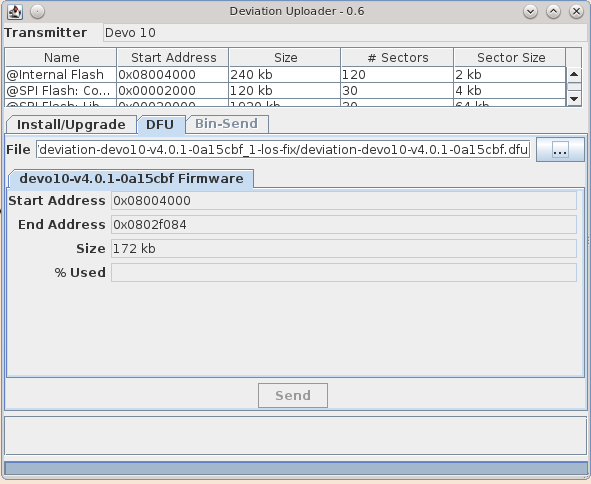
Here is 0.6.1 which makes the DFU tab work properly.
Here is 0.6.1 which makes the DFU tab work properly.
- mwm
-
- Offline
21 Apr 2015 14:17 #31463
by mwm
Do not ask me questions via PM. Ask in the forums, where I'll answer if I can.
My remotely piloted vehicle ("drone") is a yacht.
Replied by mwm on topic Need testers for USBcode
Linux Java environment is the same as yours. Ubuntu 14.04 LTS, same java version.
Running with -h gets the Deviation Uploader help.
Running with -l exits with no output. Plugging in a 6S and attaching it to that VM finds the device.
There seems to be a permissions issue. Running as me gets failures to open device.
Also seems to be an interaction with my window manager. Replacing xmonad with twm fixes the blank window problem. Possibly it's getting upset that the WM won't let it resize the window?
Finally, the issue with BSD seems to be that usb4java doesn't run on the BSD version of libusb. At least, not yet.
Running with -h gets the Deviation Uploader help.
Running with -l exits with no output. Plugging in a 6S and attaching it to that VM finds the device.
There seems to be a permissions issue. Running as me gets failures to open device.
Also seems to be an interaction with my window manager. Replacing xmonad with twm fixes the blank window problem. Possibly it's getting upset that the WM won't let it resize the window?
Finally, the issue with BSD seems to be that usb4java doesn't run on the BSD version of libusb. At least, not yet.
Do not ask me questions via PM. Ask in the forums, where I'll answer if I can.
My remotely piloted vehicle ("drone") is a yacht.
- PhracturedBlue
-
- Offline
Less
More
- Posts: 4403
21 Apr 2015 15:06 #31467
by PhracturedBlue
Replied by PhracturedBlue on topic Need testers for USBcode
As I said, in linux, you need to give yourself device permissions. I got sick of Linux's USB permission model, and added this:
/etc/udev/rules.d/10-local.rules
I then added a 'usb' group and added myself to it. Adding udev rules for the stm32 is certainly possible, and I've done it in the past, but I find the above to be easier overall.
As for BSD support, it should be easy enough to add. Would require a BSD vm though. I'll look at it sometime
/etc/udev/rules.d/10-local.rules
SUBSYSTEM=="usb", ENV{DEVTYPE}=="usb_device", GROUP="usb"I then added a 'usb' group and added myself to it. Adding udev rules for the stm32 is certainly possible, and I've done it in the past, but I find the above to be easier overall.
As for BSD support, it should be easy enough to add. Would require a BSD vm though. I'll look at it sometime
- linux-user
-
- Offline
Less
More
- Posts: 271
25 Apr 2015 18:22 - 29 Apr 2015 13:16 #31615
by linux-user
Replied by linux-user on topic Need testers for USBcode
Some usability nitpicks:
1.) after canceling Install/Upgrade you don't get a second chance
- click Install/Upgrade
- click "cancel"
- click "Install/Upgrade"
=> It won't do it anymore. "cancel" would be your only choice.
=> need to restart the software
Edit: I am not sure, but I think you never get a 2nd chance to "Install/Upgrade" regardless if you have canceled or not.
2.) When Upgrade is finished there is no obvious message in the GUI:
- You see the progress bar
- While "Install/Upgrade" is running you have the option to "cancel"
- When finished the "cancel" button changes to "Install/Upgrade"
A "FINISHED" message in the GUI would be nice
3.) Naming convention:
Filesystem / Library is confusing.
4.) What is the difference between "Format Root" and "Format Media"?
BTW:
My Devo10 didn't like this cancel experiments. Needed to remove the battery to revive it
1.) after canceling Install/Upgrade you don't get a second chance
- click Install/Upgrade
- click "cancel"
- click "Install/Upgrade"
=> It won't do it anymore. "cancel" would be your only choice.
=> need to restart the software
Edit: I am not sure, but I think you never get a 2nd chance to "Install/Upgrade" regardless if you have canceled or not.
2.) When Upgrade is finished there is no obvious message in the GUI:
- You see the progress bar
- While "Install/Upgrade" is running you have the option to "cancel"
- When finished the "cancel" button changes to "Install/Upgrade"
A "FINISHED" message in the GUI would be nice
3.) Naming convention:
Filesystem / Library is confusing.
4.) What is the difference between "Format Root" and "Format Media"?
BTW:
My Devo10 didn't like this cancel experiments. Needed to remove the battery to revive it
Last edit: 29 Apr 2015 13:16 by linux-user. Reason: spelling
Time to create page: 0.326 seconds
-
Home

-
Forum
-
Development
-
Development
- Need testers for USBcode