
- Posts: 588
extended limits on main page problem?
- Hexperience
-
Topic Author
- Offline
Less
More
23 Feb 2013 13:43 - 23 Feb 2013 13:48 #6882
by Hexperience
There are 10 types of people in this world. Those that understand binary and those that don't.
extended limits on main page problem? was created by Hexperience
Not sure how to explain this one so I will just show it.
When you extend the limits (in this case throttle) the main page still shows -100% but the channel is really -110%
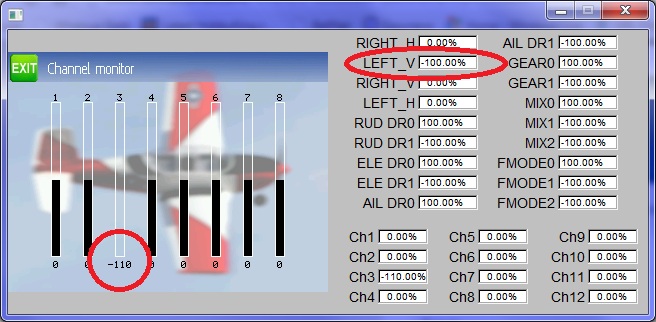
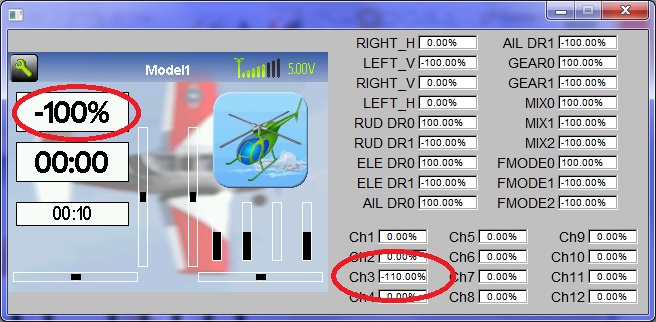
I noticed this when I extended the limit because one of my ESC's wouldn't arm at -100. When I put the throttle hold on, it does show the correct -110 value. Then if you flip TH off, it shows -100 (even though it's really -110) It kind of made me jump because I thought it was going to start spinning up.
[channel3]
safetysw=RUD DR1
safetyval=-110
scalar=110
template=simple
[mixer]
src=THR
dest=Ch3
Not sure if this is by design..?
When you extend the limits (in this case throttle) the main page still shows -100% but the channel is really -110%
I noticed this when I extended the limit because one of my ESC's wouldn't arm at -100. When I put the throttle hold on, it does show the correct -110 value. Then if you flip TH off, it shows -100 (even though it's really -110) It kind of made me jump because I thought it was going to start spinning up.
[channel3]
safetysw=RUD DR1
safetyval=-110
scalar=110
template=simple
[mixer]
src=THR
dest=Ch3
Not sure if this is by design..?
There are 10 types of people in this world. Those that understand binary and those that don't.
Last edit: 23 Feb 2013 13:48 by Hexperience.
- FDR
-
- Offline

23 Feb 2013 14:44 - 23 Feb 2013 19:29 #6885
by FDR
Replied by FDR on topic extended limits on main page problem?
It is by design.
The final scaling occure after everything else, since it is for travel adjust for example.
The final scaling occure after everything else, since it is for travel adjust for example.
Last edit: 23 Feb 2013 19:29 by FDR.
- Hexperience
-
- Offline
Less
More
- Posts: 588
23 Feb 2013 15:19 #6888
by Hexperience
There are 10 types of people in this world. Those that understand binary and those that don't.
Replied by Hexperience on topic extended limits on main page problem?
That's what I thought at first, but then when you use the safety function the display shows -110, turning TH off, and it jumps to -100.
Just need to get used to it, or maybe have the final scaling after the safety?
Just need to get used to it, or maybe have the final scaling after the safety?
There are 10 types of people in this world. Those that understand binary and those that don't.
- FDR
-
- Offline
23 Feb 2013 15:42 #6892
by FDR
Replied by FDR on topic extended limits on main page problem?
I'm a bit confused now.
The safety is not scaled AFAIK. It is simply sent out to the channel if the switch is true...
The safety is not scaled AFAIK. It is simply sent out to the channel if the switch is true...
- Hexperience
-
- Offline
Less
More
- Posts: 588
23 Feb 2013 15:58 - 23 Feb 2013 16:01 #6894
by Hexperience
There are 10 types of people in this world. Those that understand binary and those that don't.
Replied by Hexperience on topic extended limits on main page problem?
No, you are 100% correct. And that is the issue. (in a way, it's not really too big of an issue)
So I power up my TX and turn on TH. The display on the main page shows -110%. OK
I power up my 500 heli, ESC arms (channel 3 is at -110)
I turn off TH with the stick still all the way down. The display now changes to -100, even though channel 3 is really -110. There was no change in the value going to the channel, but there was a change in the value displayed on the screen. one scaled, and one not.
So I suggest that for the purpose of the display, the safety value should be scaled. ?? OR Show the real value of the channel at all times.
So I power up my TX and turn on TH. The display on the main page shows -110%. OK
I power up my 500 heli, ESC arms (channel 3 is at -110)
I turn off TH with the stick still all the way down. The display now changes to -100, even though channel 3 is really -110. There was no change in the value going to the channel, but there was a change in the value displayed on the screen. one scaled, and one not.
So I suggest that for the purpose of the display, the safety value should be scaled. ?? OR Show the real value of the channel at all times.
There are 10 types of people in this world. Those that understand binary and those that don't.
Last edit: 23 Feb 2013 16:01 by Hexperience.
- PhracturedBlue
-
- Offline

Less
More
- Posts: 4403
23 Feb 2013 18:55 #6906
by PhracturedBlue
Replied by PhracturedBlue on topic extended limits on main page problem?
As FDR said the 'scale' on the limits page was actually designed to be a servo-adjust. so you define 100% and then decide how far your servos should move. Since not all servos give the same throw, this is a way to tweak the values to get the behavior you want.
There is also 'scale' on the mixer page which actually affets the channel value shown.
The failsafe is applied last. It should possibly have the scale factor incorporated so that it has the same range as the mixer. Changing it would be difficult without breaking backwards compatibility so I probably won't.
So the issue here is that the failsafe value is passed to the output box such that the box value is different with/without safety but the servo values are tidentical.
We could fix it by 'unscaling' the mixerlimit or displaying the final channel value on the main page. If I recall, I initially did the latter and we decided to change it to the way it is now.
There is also 'scale' on the mixer page which actually affets the channel value shown.
The failsafe is applied last. It should possibly have the scale factor incorporated so that it has the same range as the mixer. Changing it would be difficult without breaking backwards compatibility so I probably won't.
So the issue here is that the failsafe value is passed to the output box such that the box value is different with/without safety but the servo values are tidentical.
We could fix it by 'unscaling' the mixerlimit or displaying the final channel value on the main page. If I recall, I initially did the latter and we decided to change it to the way it is now.
- FDR
-
- Offline
23 Feb 2013 19:35 #6908
by FDR
Replied by FDR on topic extended limits on main page problem?
Just to avoid confusion, we are talking about safety value, not the failsafe value, however I'm sure PB meant that too...
BTW the safety value was in the range of -100%..+100%, and just recently allows you to set it outside that...
There are too much changes, at too high rate.
We probably should think more then coding...
BTW the safety value was in the range of -100%..+100%, and just recently allows you to set it outside that...
There are too much changes, at too high rate.
We probably should think more then coding...
- rbe2012
-
- Offline
- So much to do, so little time...

Less
More
- Posts: 1433
24 Feb 2013 06:26 #6922
by rbe2012
Replied by rbe2012 on topic extended limits on main page problem?
TH will be the main use for channels with safety which value is shown on the screen. Can we give it another color (maybe white on black for bw) when safety is activated?
I admit I was confused more than once to see different values at different positions (e.g. the bars on main screen vs. channel monitor).
I admit I was confused more than once to see different values at different positions (e.g. the bars on main screen vs. channel monitor).
- PhracturedBlue
-
- Offline
Less
More
- Posts: 4403
24 Feb 2013 16:15 #6962
by PhracturedBlue
Replied by PhracturedBlue on topic extended limits on main page problem?
I've been thinking about this and the following makes the most sense to me:
the ch-reverse and scale should be applied to the safety value. The purpose of the safety is to force the servo to a specific value, and I think the most intuitive value would be the value you see on the main screen (which does not include scaling)
the ch-reverse and scale should be applied to the safety value. The purpose of the safety is to force the servo to a specific value, and I think the most intuitive value would be the value you see on the main screen (which does not include scaling)
- rbe2012
-
- Offline
- So much to do, so little time...
Less
More
- Posts: 1433
24 Feb 2013 20:42 #6989
by rbe2012
Replied by rbe2012 on topic extended limits on main page problem?
PB, I think you are right. I have not found a case where I would use a safety value outside the range of the regular servo travel. And might it be necessary, I could handle this with mixer scale and offset.
- PhracturedBlue
-
- Offline
Less
More
- Posts: 4403
03 Mar 2013 01:55 #7238
by PhracturedBlue
Replied by PhracturedBlue on topic extended limits on main page problem?
I've committed the above change. We'll see how it goes.
- domcars0
-
- Offline

Less
More
- Posts: 390
03 Mar 2013 12:20 - 03 Mar 2013 12:49 #7279
by domcars0
Devo 10 (+7e) owner. It's mine, please don't touch it with your big fingers
Replied by domcars0 on topic extended limits on main page problem?
Hi PB,
Could you please explain your last changes in mixer.c function MIXER_ApplyLimits() , cause I do not understand (probably I miss something sorry)?
There isand some lines later there is
For me, code will always goes in this 'if' .. so what is 'applied_safety' for ? Don't you miss:
?
Could you please explain your last changes in mixer.c function MIXER_ApplyLimits() , cause I do not understand (probably I miss something sorry)?
There is
...
int applied_safety = 0;
......
if (! applied_safety) {
....For me, code will always goes in this 'if' .. so what is 'applied_safety' for ? Don't you miss:
if ((flags & APPLY_SAFETY) && MIXER_SRC(limit->safetysw)  && switch_is_on(limit->safetysw, _raw)) {
+       applied_safety = 1;
        value = PCT_TO_RANGE(Model.limits[channel].safetyval);
}Devo 10 (+7e) owner. It's mine, please don't touch it with your big fingers
Last edit: 03 Mar 2013 12:49 by domcars0.
- PhracturedBlue
-
- Offline
Less
More
- Posts: 4403
03 Mar 2013 13:43 - 03 Mar 2013 13:43 #7286
by PhracturedBlue
Replied by PhracturedBlue on topic extended limits on main page problem?
yep. I haven't been able to test on real Tx, so just a dumb mistake.
Last edit: 03 Mar 2013 13:43 by PhracturedBlue.
- Hexperience
-
- Offline
Less
More
- Posts: 588
03 Mar 2013 13:52 #7288
by Hexperience
There are 10 types of people in this world. Those that understand binary and those that don't.
Replied by Hexperience on topic extended limits on main page problem?
With or without domcars added line it doesn't seem to work for me.
Personally I would prefer to see the true value in the boxes. If it shows -110 then I know the channel is -110. No guess work.
Personally I would prefer to see the true value in the boxes. If it shows -110 then I know the channel is -110. No guess work.
There are 10 types of people in this world. Those that understand binary and those that don't.
Time to create page: 0.773 seconds
-
Home

-
Forum
-
News, Announcements and Feedback
-
Feedback & Questions
- extended limits on main page problem?