
- Posts: 19
Seriously uncalibrated screen
- jm1974
-
Topic Author
- Offline
Less
More
11 Sep 2013 23:08 #13716
by jm1974
Seriously uncalibrated screen was created by jm1974
Hi,
I've been using this excellent firmware for a while now. However I've got a calibration problem that just seems to get worse and worse. I've been using solely the buttons for some time. But now I can't even get into the model selection. Sure I can work around it by going to the model setup and load a file but I would like some help debugging. I've posted two videos, one with deviationtx where it is seriously not calibrated although I do the calibration. And another where I put back the original firmware and where there is "only" a much smaller problem in the lower middle part of the screen.
Any ideas are welcome
Thanks!
I've been using this excellent firmware for a while now. However I've got a calibration problem that just seems to get worse and worse. I've been using solely the buttons for some time. But now I can't even get into the model selection. Sure I can work around it by going to the model setup and load a file but I would like some help debugging. I've posted two videos, one with deviationtx where it is seriously not calibrated although I do the calibration. And another where I put back the original firmware and where there is "only" a much smaller problem in the lower middle part of the screen.
Any ideas are welcome
Thanks!
- rbe2012
-
- Offline
- So much to do, so little time...

Less
More
- Posts: 1433
12 Sep 2013 09:11 #13725
by rbe2012
Replied by rbe2012 on topic Seriously uncalibrated screen
I looked at your video. I assume that every time you repeat the calibrating the results are similar.
It looks as if the touch sensor in y-direction does not work correctly. The test screen shows correct values for x (near 0 to greater 310). For y they are in a very small range.
It is interesting that the touches are recognized where ever you touch the screen so there are no "blind" areas. Maybe we could try to optimize it by recalculating the calibration values manually. Please post them (they are in the tx.ini) - maybe try recalibations and post a couple of them. I will look at them later and give you new values to test.
Another way: I have increased touch screen accuracy for the Devo12. I can give you a dfu-file to test with.
It looks as if the touch sensor in y-direction does not work correctly. The test screen shows correct values for x (near 0 to greater 310). For y they are in a very small range.
It is interesting that the touches are recognized where ever you touch the screen so there are no "blind" areas. Maybe we could try to optimize it by recalculating the calibration values manually. Please post them (they are in the tx.ini) - maybe try recalibations and post a couple of them. I will look at them later and give you new values to test.
Another way: I have increased touch screen accuracy for the Devo12. I can give you a dfu-file to test with.
- RandMental
-
- Offline

Less
More
- Posts: 521
12 Sep 2013 11:01 #13729
by RandMental
Replied by RandMental on topic Seriously uncalibrated screen
If I remember correctly there is a touchscreen connector in the 8S on the bottom right hand side of the PCB (Looking from the back after removing the back panel).
To me it sounds like a bad connection since you said it became progressively worse. Open the TX and wiggle the connector a bit, it might just be oxidation or humidity on the connector pins.
To me it sounds like a bad connection since you said it became progressively worse. Open the TX and wiggle the connector a bit, it might just be oxidation or humidity on the connector pins.
- jm1974
-
- Offline
Less
More
- Posts: 19
12 Sep 2013 19:53 #13741
by jm1974
Replied by jm1974 on topic Seriously uncalibrated screen
Current one
[touch]
xscale=197312
yscale=147271
xoffset=-404
yoffset=-20
Another one from a while ago
[touch]
xscale=189176
yscale=135926
xoffset=-384
yoffset=-8
Here's a pretty strange one I was able to produce yesterday
[touch]
xscale=-965793
yscale=1101004
xoffset=2996
yoffset=-754
I wouldn't mind the dfu file
Thanks
[touch]
xscale=197312
yscale=147271
xoffset=-404
yoffset=-20
Another one from a while ago
[touch]
xscale=189176
yscale=135926
xoffset=-384
yoffset=-8
Here's a pretty strange one I was able to produce yesterday
[touch]
xscale=-965793
yscale=1101004
xoffset=2996
yoffset=-754
I wouldn't mind the dfu file
Thanks
- jm1974
-
- Offline
Less
More
- Posts: 19
12 Sep 2013 22:14 - 12 Sep 2013 22:16 #13745
by jm1974
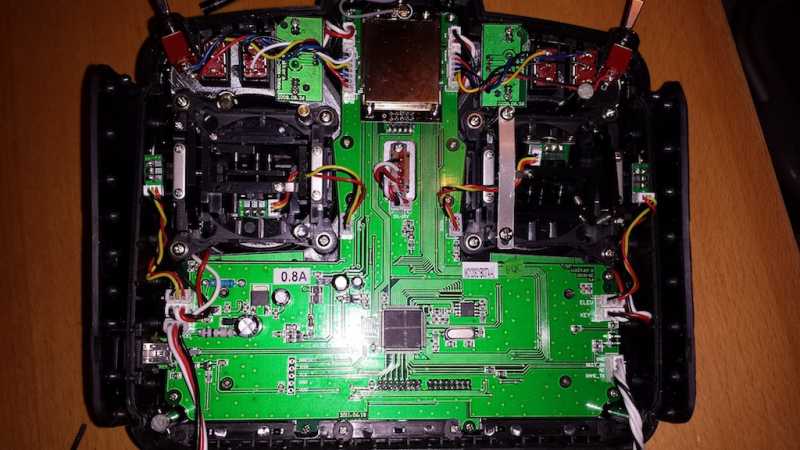
Not sure where that would be. I took it apart but didn't see anything obvious. Here's a picture of it
Replied by jm1974 on topic Seriously uncalibrated screen
RandMental wrote: If I remember correctly there is a touchscreen connector in the 8S on the bottom right hand side of the PCB (Looking from the back after removing the back panel).
Not sure where that would be. I took it apart but didn't see anything obvious. Here's a picture of it
Last edit: 12 Sep 2013 22:16 by jm1974.
- rbe2012
-
- Offline
- So much to do, so little time...
Less
More
- Posts: 1433
14 Sep 2013 08:24 - 14 Sep 2013 08:29 #13780
by rbe2012
Replied by rbe2012 on topic Seriously uncalibrated screen
--deleted--
Last edit: 14 Sep 2013 08:29 by rbe2012.
- rbe2012
-
- Offline
- So much to do, so little time...
Less
More
- Posts: 1433
14 Sep 2013 08:29 #13781
by rbe2012
Replied by rbe2012 on topic Seriously uncalibrated screen
I have uploaded a dfu file for Devo8 in the development section (
http://www.deviationtx.com/forum/builds/2184-devo8-with-some-improvements-esp-touch-screen#13779
).
You can try this and see if the results of some calibrations are now in a smaller range.
To get to the connector you have to remove the board. It is located in the middle at the bottom. From the back side you see two rows of pins - this is where the connector is soldered. When I remember right, there is another board connected which has a foil connector to the display. Try to check if the connection of this foil connector is good.
You can try this and see if the results of some calibrations are now in a smaller range.
To get to the connector you have to remove the board. It is located in the middle at the bottom. From the back side you see two rows of pins - this is where the connector is soldered. When I remember right, there is another board connected which has a foil connector to the display. Try to check if the connection of this foil connector is good.
- jm1974
-
- Offline
Less
More
- Posts: 19
14 Sep 2013 22:38 #13799
by jm1974
Replied by jm1974 on topic Seriously uncalibrated screen
Thank you very much rbe2012, I've tried it, it is very similar. I wouldn't be able to say whether it is better or not it is still far from useable.
I suppose I could take it apart, but I don't see how that could have something to do with it as with the walkera firmware I have only a problem in the lower middle part of the screen. Of course if you still think it is meaningful I'll try it.
Thank you very much for your efforts.
Johan
I suppose I could take it apart, but I don't see how that could have something to do with it as with the walkera firmware I have only a problem in the lower middle part of the screen. Of course if you still think it is meaningful I'll try it.
Thank you very much for your efforts.
Johan
- jm1974
-
- Offline
Less
More
- Posts: 19
14 Sep 2013 22:39 #13800
by jm1974
Replied by jm1974 on topic Seriously uncalibrated screen
almost forgot the tx.ini after install and calibration
[touch]
xscale=189176
yscale=220200
xoffset=-384
yoffset=-75
[touch]
xscale=189176
yscale=220200
xoffset=-384
yoffset=-75
- richardclli
-
- Offline

Less
More
- Posts: 199
17 Sep 2013 05:08 #13846
by richardclli
Replied by richardclli on topic Seriously uncalibrated screen
Actually, Devo 8S used a resistive touch screen. When dirt/dust accumulated near the edges of the screen, these particles will give the screen pressures on the sides and make the touch screen inaccurate.
To solve this, you can disassemble the screen from the case and clean the edges of the screen and the case, hopefully you can get a good screen afterwards.
My screen have this problem before and I solve it using this method.
To solve this, you can disassemble the screen from the case and clean the edges of the screen and the case, hopefully you can get a good screen afterwards.
My screen have this problem before and I solve it using this method.
- jm1974
-
- Offline
Less
More
- Posts: 19
26 Sep 2013 00:31 #14059
by jm1974
Thanks for the tip. Didn't work for me though.
Replied by jm1974 on topic Seriously uncalibrated screen
richardclli wrote: To solve this, you can disassemble the screen from the case and clean the edges of the screen and the case, hopefully you can get a good screen afterwards.
Thanks for the tip. Didn't work for me though.
- HeliBen
-
- Offline

Less
More
- Posts: 7
26 Sep 2013 15:34 #14074
by HeliBen
Replied by HeliBen on topic Seriously uncalibrated screen
I have had this same problem for some time. I've been using the buttons to navigate through the screens. I'd love to figure out the issue. The tough screen was great when it worked properly.
- jm1974
-
- Offline
Less
More
- Posts: 19
26 Sep 2013 21:25 #14078
by jm1974
Replied by jm1974 on topic Seriously uncalibrated screen
I haven't been able to use the buttons for some navigations, for instance from the main screen I can only access the telemetry view and I haven't figured out how to access model settings, model change and tx settings. Does this exist with some magic button combination? It would definately help me a lot.
In the meanwhile I'm ordering a new screen from the retailer that sold the tx to me. He's asking 22€ for it. I've seen somewhere on this forum that you can get it for 20$ but I can't find any information on that.
Cheers.
In the meanwhile I'm ordering a new screen from the retailer that sold the tx to me. He's asking 22€ for it. I've seen somewhere on this forum that you can get it for 20$ but I can't find any information on that.
Cheers.
- FDR
-
- Offline

27 Sep 2013 04:26 #14088
by FDR
Replied by FDR on topic Seriously uncalibrated screen
Wow, can't you even touch the large model icon?
...or the model nam, which is large enough too?
Then you have serious fault indeed...
You can access anything with the buttons, like it is decribed in the manual pn page 9.
For example on the main page press long ENT, then you can navigate with the up/down buttons, and then press ENT.
Additionally you can assign the model setup page and the transmitter config page to be in the switching sequence from the main page, just like to the telemetry page from the main page config page (on the add control popup, depending on the version you use).
...or the model nam, which is large enough too?
Then you have serious fault indeed...
You can access anything with the buttons, like it is decribed in the manual pn page 9.
For example on the main page press long ENT, then you can navigate with the up/down buttons, and then press ENT.
Additionally you can assign the model setup page and the transmitter config page to be in the switching sequence from the main page, just like to the telemetry page from the main page config page (on the add control popup, depending on the version you use).
- jm1974
-
- Offline
Less
More
- Posts: 19
29 Sep 2013 07:48 #14128
by jm1974

Awesome, thanks for the tip!
Replied by jm1974 on topic Seriously uncalibrated screen
Well I can slide my finger from the bottom right up to the middle and it will activate the large model icon, nothing else works right now. So I'm thinking it is just a matter of time b4 everything stops workingFDR wrote: Wow, can't you even touch the large model icon?
...or the model nam, which is large enough too?
FDR wrote: You can access anything with the buttons, like it is decribed in the manual pn page 9.
For example on the main page press long ENT, then you can navigate with the up/down buttons, and then press ENT.
Additionally you can assign the model setup page and the transmitter config page to be in the switching sequence from the main page, just like to the telemetry page from the main page config page (on the add control popup, depending on the version you use).
Awesome, thanks for the tip!
- jm1974
-
- Offline
Less
More
- Posts: 19
24 Oct 2013 21:10 - 24 Oct 2013 21:16 #14930
by jm1974
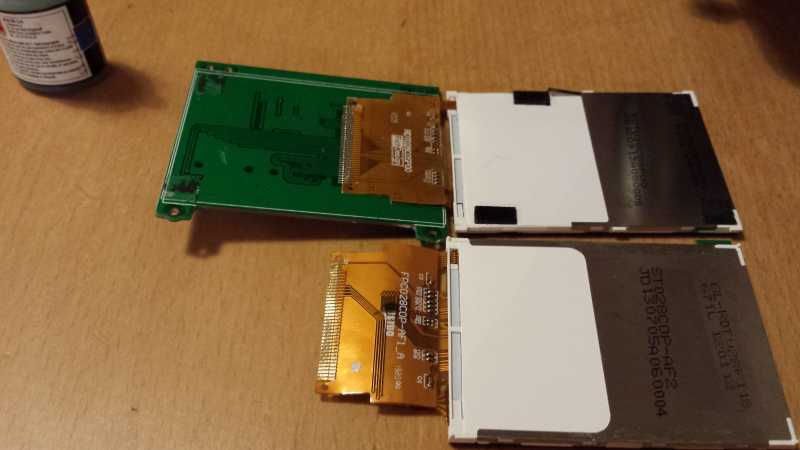
HELP! I bought a replacement screen from walkera. But how on earth do I go about changing it?!
I just tore some of the old connections while trying to remove the old one. I don't understand how the old one is fixed, it seems like some kind of glue. Is it normal that I won't be able to remove the old one without ruining it (if it's not yet done)? And once I've put the new one in place what do I use to make it stick to the circuit board?
I'm quite afraid I won't be able to fly in weeks without buying another tx
Replied by jm1974 on topic Seriously uncalibrated screen
HELP! I bought a replacement screen from walkera. But how on earth do I go about changing it?!
I just tore some of the old connections while trying to remove the old one. I don't understand how the old one is fixed, it seems like some kind of glue. Is it normal that I won't be able to remove the old one without ruining it (if it's not yet done)? And once I've put the new one in place what do I use to make it stick to the circuit board?
I'm quite afraid I won't be able to fly in weeks without buying another tx
Last edit: 24 Oct 2013 21:16 by jm1974. Reason: fix image link
- jm1974
-
- Offline
Less
More
- Posts: 19
28 Oct 2013 23:26 #15099
by jm1974
Replied by jm1974 on topic Seriously uncalibrated screen
Didn't anyone do this replacement?
- SadSack
-
- Offline

Less
More
- Posts: 317
28 Oct 2013 23:31 #15100
by SadSack
Replied by SadSack on topic Seriously uncalibrated screen
you have used soldering iron to desolder ribbon ?
- SadSack
-
- Offline
Less
More
- Posts: 317
28 Oct 2013 23:32 #15101
by SadSack
Replied by SadSack on topic Seriously uncalibrated screen
The sticky rubber like stuff could be removed with solvent. Small amount as a test first.
- jm1974
-
- Offline
Less
More
- Posts: 19
29 Oct 2013 01:44 #15103
by jm1974
Replied by jm1974 on topic Seriously uncalibrated screen
No I didn't try soldering iron nor Solvent. Should I use both to get it off. Then how do I put the new one there? Not by soldering the pins one by one right?
Time to create page: 1.015 seconds
-
Home

-
Forum
-
News, Announcements and Feedback
-
Feedback & Questions
- Seriously uncalibrated screen