
- Posts: 51
PB's dfues v2.0
- Freezywilly
-
Topic Author
- Offline
Less
More
13 Nov 2013 14:48 #15548
by Freezywilly
PB's dfues v2.0 was created by Freezywilly
I may have shot myself in the foot. 
I downloaded dfuse v2.0 on windows 8.1 and installed it.
I downloaded rbe1202's latest beta 11
I ran dfuse and upgraded my devo 12s.
I then tried to upgrade the library but it would not upgrade. It only offered update.
Yea working late and not thinking.
While everything seemed to have installed I may have a problem running the 12s. Turn it on and get a screen with only the toolbar at the top.
I selected transmitter update and was able to calibrate the touchscreen. Below that is a second calibration selection that only shows a blank screen. The toolbar allows me to page through the transmitter options such as telimetry and grapic bars for the controls. They do not display any interaction for the sticks.
I assume I have a bum build so I need some feedback on repairs. Is there a simple fix or am I forced it a lot of downtime and a major rebuild?
Any feedback welcome.
thanks, Bill
I downloaded dfuse v2.0 on windows 8.1 and installed it.
I downloaded rbe1202's latest beta 11
I ran dfuse and upgraded my devo 12s.
I then tried to upgrade the library but it would not upgrade. It only offered update.
Yea working late and not thinking.
While everything seemed to have installed I may have a problem running the 12s. Turn it on and get a screen with only the toolbar at the top.
I selected transmitter update and was able to calibrate the touchscreen. Below that is a second calibration selection that only shows a blank screen. The toolbar allows me to page through the transmitter options such as telimetry and grapic bars for the controls. They do not display any interaction for the sticks.
I assume I have a bum build so I need some feedback on repairs. Is there a simple fix or am I forced it a lot of downtime and a major rebuild?
Any feedback welcome.
thanks, Bill
- vlad_vy
-
- Offline

Less
More
- Posts: 3333
13 Nov 2013 15:11 #15549
by vlad_vy
Replied by vlad_vy on topic PB's dfues v2.0
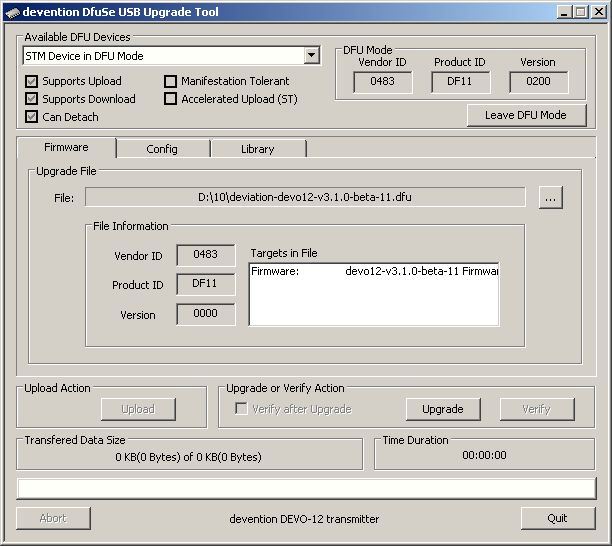
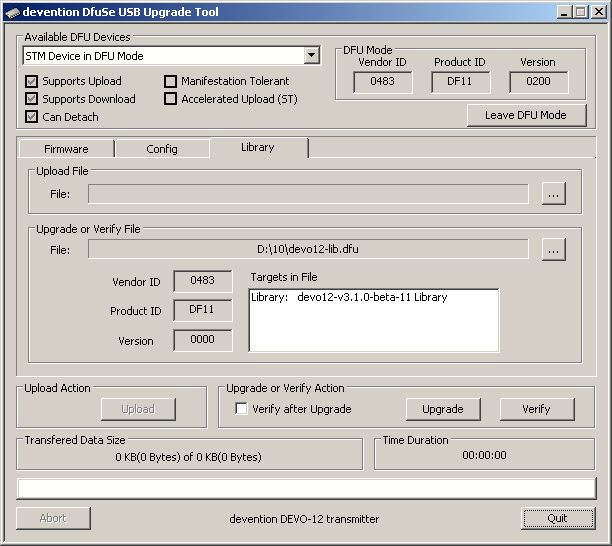
I don't see any problem with Dfuse 2.0
- Freezywilly
-
- Offline
Less
More
- Posts: 51
13 Nov 2013 15:14 #15550
by Freezywilly
Replied by Freezywilly on topic PB's dfues v2.0
I did not see the same results but will try again.
- rbe2012
-
- Offline
- So much to do, so little time...

Less
More
- Posts: 1433
13 Nov 2013 19:46 - 13 Nov 2013 19:46 #15553
by rbe2012
Replied by rbe2012 on topic PB's dfues v2.0
In the second picture (library) you have two buttons with three dots to select a file. If you select a file with the upper button, you choose upload (what effectively means download), with the second you get upgrade.
Last edit: 13 Nov 2013 19:46 by rbe2012.
- Freezywilly
-
- Offline
Less
More
- Posts: 51
14 Nov 2013 01:14 #15560
by Freezywilly
Replied by Freezywilly on topic PB's dfues v2.0
After I did the upgrade using the first file it then would not let me choose a new file in the first selection thus I had to use the second which was upgrade but I did not realize it.
I guess it is working.
Now my second question: in the tranmitter settings are two calibrate functions. The first is screen calibrate which worked. The second calibrate only shows a blank screen and does nothing. What have I missed?
I guess it is working.
Now my second question: in the tranmitter settings are two calibrate functions. The first is screen calibrate which worked. The second calibrate only shows a blank screen and does nothing. What have I missed?
- vlad_vy
-
- Offline
Less
More
- Posts: 3333
14 Nov 2013 03:17 #15562
by vlad_vy
Replied by vlad_vy on topic PB's dfues v2.0
After you flashed library? Or before it?
- rbe2012
-
- Offline
- So much to do, so little time...
Less
More
- Posts: 1433
14 Nov 2013 06:52 #15566
by rbe2012
Replied by rbe2012 on topic PB's dfues v2.0
...and with the USB drive prepared (formatted and copied the file system onto)?
- Freezywilly
-
- Offline
Less
More
- Posts: 51
14 Nov 2013 15:26 #15572
by Freezywilly
Replied by Freezywilly on topic PB's dfues v2.0
I have an additional problem. After formatting the disk on the devo 12s and attempting to extract to filesystem to it I get an error message.
Error states I have available 1.96 and the extraction requires 1.97 thus will not copy to disk.
Error states I have available 1.96 and the extraction requires 1.97 thus will not copy to disk.
- FDR
-
- Offline

14 Nov 2013 15:34 #15573
by FDR
Replied by FDR on topic PB's dfues v2.0
Well, don't extract directly to the USB drive, but to your hard drive first...
- Freezywilly
-
- Offline
Less
More
- Posts: 51
14 Nov 2013 15:42 #15574
by Freezywilly
Replied by Freezywilly on topic PB's dfues v2.0
Ok got it fixed. Had to do it the hard way and copy individual files one at a time. All seems well now. will now do some testing.
- FDR
-
- Offline
14 Nov 2013 15:45 #15576
by FDR
Replied by FDR on topic PB's dfues v2.0
Yep, copying with the Windows explorer checks the available space, and doesn't calculate with overwrites.
However you can use Total commander for example to copy all selected files, it will handle...
However you can use Total commander for example to copy all selected files, it will handle...
- Freezywilly
-
- Offline
Less
More
- Posts: 51
14 Nov 2013 15:52 #15578
by Freezywilly
Replied by Freezywilly on topic PB's dfues v2.0
Off topic: When are we going to get to Linux?
I hate windows.
I hate windows.
- rbe2012
-
- Offline
- So much to do, so little time...
Less
More
- Posts: 1433
14 Nov 2013 19:34 #15584
by rbe2012
Replied by rbe2012 on topic PB's dfues v2.0
Just to stay off-topic... I develop with linux, I have the emulators running with linux, PB's tool runs with linux, the USB drive is detected by linux - did I miss something?
For clearance: I also develop with Windows (XP, 7, Vista) depending on which PC I use...
For clearance: I also develop with Windows (XP, 7, Vista) depending on which PC I use...
- Freezywilly
-
- Offline
Less
More
- Posts: 51
14 Nov 2013 22:56 - 14 Nov 2013 22:59 #15591
by Freezywilly
Replied by Freezywilly on topic PB's dfues v2.0
Ok I have some dumb questions. The zip files i have downloaded for the PB dfuse have an exe thus are a windows executable. Where can I get the Linux version of the zip? I would like to work with this because I only had the windows versions to work with.
I assume then that the dfu files once unzipped in linux are then the exact same.
So lead me by the hand and I want to try this for my own satisfaction.
PS I have been using linux for about the last 8 years.
I assume then that the dfu files once unzipped in linux are then the exact same.
So lead me by the hand and I want to try this for my own satisfaction.
PS I have been using linux for about the last 8 years.
Last edit: 14 Nov 2013 22:59 by Freezywilly.
- rbe2012
-
- Offline
- So much to do, so little time...
Less
More
- Posts: 1433
15 Nov 2013 07:22 #15598
by rbe2012
Replied by rbe2012 on topic PB's dfues v2.0
What is shown above (and what you used) is not PB's tool but the official Walkera Update Tool which is designed for Windows.
For PB's tool look here: Deviation-Upload-0.5 .
I confess I never tested it (too lazy to try), but I heard that it works well.
For PB's tool look here: Deviation-Upload-0.5 .
I confess I never tested it (too lazy to try), but I heard that it works well.
Time to create page: 1.157 seconds
-
Home

-
Forum
-
News, Announcements and Feedback
-
Feedback & Questions
- PB's dfues v2.0