
Docker containers for building deviation
- FDR
-
- Offline

Less
More
27 Jan 2017 14:24 #58431
by FDR
Replied by FDR on topic Docker containers for building deviation
How can I compile (or rather extract) the language files using the docker?
I've tried this to no avail:It seems, that it didn't change anything, the language file is still the same both in the src/fs/language directory and the src/filesystem/devo10/language output directory, if that is the output directory at all...
I've tried this to no avail:
./dmake LANGUAGE=hu TARGET=devo10- vlad_vy
-
- Offline

Less
More
- Posts: 3333
27 Jan 2017 14:32 - 27 Jan 2017 14:33 #58432
by vlad_vy
Replied by vlad_vy on topic Docker containers for building deviation
I don't know about docker, but for build environment it will be: make language
(../utils/extract_strings.pl -update)
You will find new files at src/fs/language directory
(../utils/extract_strings.pl -update)
You will find new files at src/fs/language directory
Last edit: 27 Jan 2017 14:33 by vlad_vy.
- FDR
-
- Offline
27 Jan 2017 15:42 #58433
by FDR
Replied by FDR on topic Docker containers for building deviation
Thanks, that did the trick!
I opened the Shell from the docker, and in the src directory the "make language" has worked.
I opened the Shell from the docker, and in the src directory the "make language" has worked.
- vlad_vy
-
- Offline
Less
More
- Posts: 3333
27 Jan 2017 16:53 #58440
by vlad_vy
Replied by vlad_vy on topic Docker containers for building deviation
FDR, can you copy "zip" command output (help) from docker shell?
- FDR
-
- Offline
27 Jan 2017 17:26 #58442
by FDR
Replied by FDR on topic Docker containers for building deviation
Copyright (c) 1990-2008 Info-ZIP - Type 'zip "-L"' for software license.
Zip 3.0 (July 5th 2008). Usage:
zip [-options] [-b path] [-t mmddyyyy] [-n suffixes] [zipfile list] [-xi list]
  The default action is to add or replace zipfile entries from list, which
  can include the special name - to compress standard input.
  If zipfile and list are omitted, zip compresses stdin to stdout.
  -f   freshen: only changed files  -u   update: only changed or new files
  -d   delete entries in zipfile    -m   move into zipfile (delete OS files)
  -r   recurse into directories     -j   junk (don't record) directory names
  -0   store only                   -l   convert LF to CR LF (-ll CR LF to LF)
  -1   compress faster              -9   compress better
  -q   quiet operation              -v   verbose operation/print version info
  -c   add one-line comments        -z   add zipfile comment
  -@   read names from stdin        -o   make zipfile as old as latest entry
  -x   exclude the following names  -i   include only the following names
  -F   fix zipfile (-FF try harder) -D   do not add directory entries
  -A   adjust self-extracting exe   -J   junk zipfile prefix (unzipsfx)
  -T   test zipfile integrity       -X   eXclude eXtra file attributes
  -y   store symbolic links as the link instead of the referenced file
  -e   encrypt                      -n   don't compress these suffixes
-h2 show more help- vlad_vy
-
- Offline
Less
More
- Posts: 3333
27 Jan 2017 17:51 #58444
by vlad_vy
Replied by vlad_vy on topic Docker containers for building deviation
Thank you. Anyway, zip -x option has to be last in command line.
- mwm
-
Topic Author
- Offline
16 May 2017 22:07 #62374
by mwm
So it seems that nobody has done this for the docker image we distribute yet?
Do not ask me questions via PM. Ask in the forums, where I'll answer if I can.
My remotely piloted vehicle ("drone") is a yacht.
Replied by mwm on topic Docker containers for building deviation
PhracturedBlue wrote: I did not include the ability to build linux-based emulators in the script yet.
It can be done by going into the shell and doing 'sudo apt-get install libfltk1.3-dev' (this is mentioned in this thread above)
So it seems that nobody has done this for the docker image we distribute yet?
Do not ask me questions via PM. Ask in the forums, where I'll answer if I can.
My remotely piloted vehicle ("drone") is a yacht.
- Phobos
-
- Offline

Less
More
- Posts: 16
13 Nov 2018 17:40 #71742
by Phobos
Replied by Phobos on topic Docker containers for building deviation
Hi, I have a problem with my docker container :/
My machine is windows 10 and I'm running the dockerToolbox. Everything works fine when I dont bind the git folder, but I want to use my own code.
My machine is windows 10 and I'm running the dockerToolbox. Everything works fine when I dont bind the git folder, but I want to use my own code.
$ docker create -it -v /e/quad/deviation/build:/release -v /e/quad:/git --name deviation_build deviationtx/deviation-do
cker
e6509598dff8f71a37a600f33eb4145858028482870a52880b3c6dceec029dea

pawel@PHOBOS-PC MINGW64 /e/quad/deviation/build (master)
$ docker start -i deviation_build
  % Total    % Received % Xferd  Average Speed   Time    Time     Time  Current
                                 Dload  Upload   Total   Spent    Left  Speed
100 14058  100 14058    0     0  22220      0 --:--:-- --:--:-- --:--:-- 22208
Updating build.py
Traceback (most recent call last):
  File "/root/build.py", line 389, in <module>
    main()
  File "/root/build.py", line 335, in main
    cmd = gui(config)
  File "/root/build.py", line 101, in gui
    txs, emus = get_targets(GITDIR + "/src/target/")
  File "/root/build.py", line 51, in get_targets
    for f in sorted(os.listdir(dir)):
OSError: [Errno 2] No such file or directory: '/git/deviation/src/target/'- Phobos
-
- Offline
Less
More
- Posts: 16
13 Nov 2018 18:37 - 15 Dec 2018 10:46 #71745
by Phobos
Replied by Phobos on topic Docker containers for building deviation
Ok, turns out docker toolbox does not allow to bind folders outside C:/Users. I was able to find a workaround for this limitation, the solution can be found under this link:
support.divio.com/local-development/dock...oxdocker-for-windows
1. Stop Docker Machine if it's running, with docker-machine stop.
2. In VirtualBox, add a Shared Folder: Settings > Shared Folders > Add share - this will be the directory where you want to locate your project, such as D:\Projects\Divio. Give it an appropriate Folder Name, such as Divio.
3. Restart Docker Machine, with docker-machine start.
4. SSH into the Docker Machine, with docker-machine ssh.
5. Create a directory in the machine as a mount point for the project directories, for example: mkdir projects. This will be /home/docker/projects - you can verify it by running pwd.
6. Mount the Shared Folder you named above (Divio) at the mount point you have created: sudo mount -t vboxsf -o uid=1000,gid=50 Divio /home/docker/projects
You can set up permanent mounting by editing the Boot2Docker configuration.
Edit /mnt/sda1/var/lib/boot2docker/profile (you may need to use sudo when opening the file) and add the commands:
mkdir /home/docker/projects
sudo mount -t vboxsf -o uid=1000,gid=50 Divio /home/docker/projects
Then folders can be mounted like so:
$ eval $(docker-machine env default)
$ docker create -it -v /home/docker/<yourReleaseFolder>:/release -v /home/docker/<yourGitFolder>:/git --name deviation_build deviationtx/deviation-docker
support.divio.com/local-development/dock...oxdocker-for-windows
1. Stop Docker Machine if it's running, with docker-machine stop.
2. In VirtualBox, add a Shared Folder: Settings > Shared Folders > Add share - this will be the directory where you want to locate your project, such as D:\Projects\Divio. Give it an appropriate Folder Name, such as Divio.
3. Restart Docker Machine, with docker-machine start.
4. SSH into the Docker Machine, with docker-machine ssh.
5. Create a directory in the machine as a mount point for the project directories, for example: mkdir projects. This will be /home/docker/projects - you can verify it by running pwd.
6. Mount the Shared Folder you named above (Divio) at the mount point you have created: sudo mount -t vboxsf -o uid=1000,gid=50 Divio /home/docker/projects
You can set up permanent mounting by editing the Boot2Docker configuration.
Edit /mnt/sda1/var/lib/boot2docker/profile (you may need to use sudo when opening the file) and add the commands:
mkdir /home/docker/projects
sudo mount -t vboxsf -o uid=1000,gid=50 Divio /home/docker/projects
Then folders can be mounted like so:
$ eval $(docker-machine env default)
$ docker create -it -v /home/docker/<yourReleaseFolder>:/release -v /home/docker/<yourGitFolder>:/git --name deviation_build deviationtx/deviation-docker
Last edit: 15 Dec 2018 10:46 by Phobos.
- wind10071
-
- Offline

Less
More
- Posts: 20
22 Jan 2019 17:57 #72475
by wind10071
Replied by wind10071 on topic Docker build errors !!!!
Building with Docker Containers errors !!!!
Why is that? Did I miss any plugins? How to install this plugin, I screenshot, win10 system
Need help
:哇噢:
Why is that? Did I miss any plugins? How to install this plugin, I screenshot, win10 system
Need help
:哇噢:
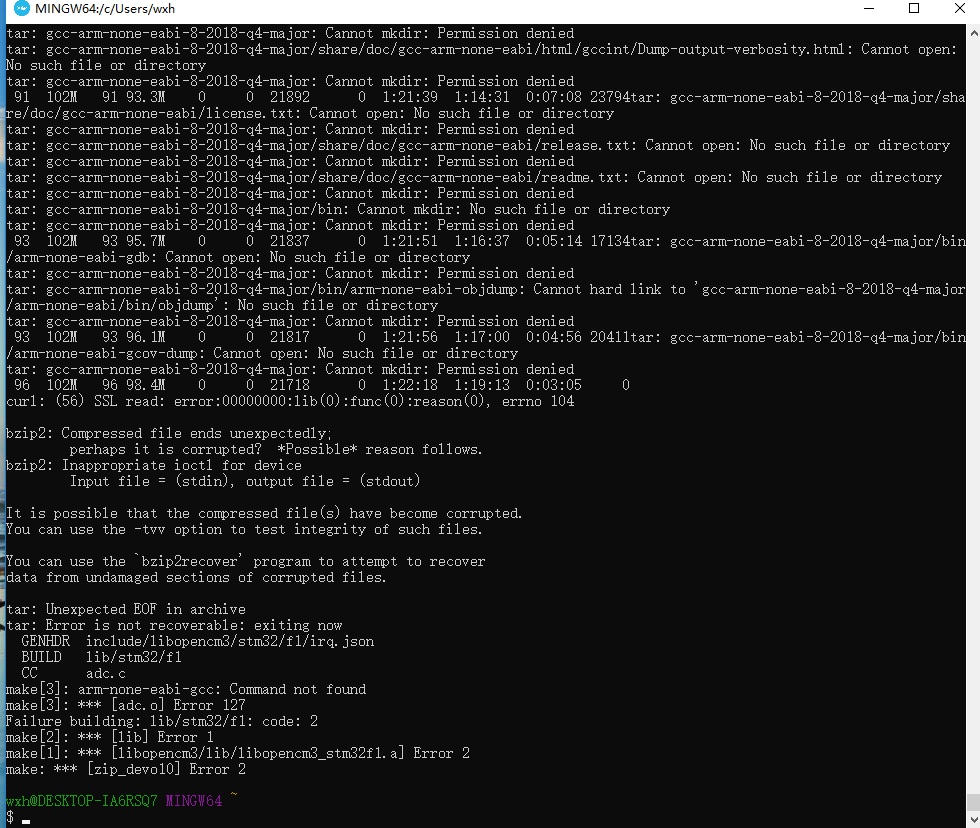
- FDR
-
- Offline
12 May 2019 19:54 - 12 May 2019 19:54 #74286
by FDR
Replied by FDR on topic Docker containers for building deviation
I tried to build with the docker and got the same error, see the attachment...
My building environment was quite old, so I tried to refresh it: updated the docker and pulled a fresh git repo. The docker and the build starts fine, but got those permission errors even when I run the cmd as administrator.
I'm on Windows 10, and run the docker with Win10's own inbuilt virtualization from the command window...
My building environment was quite old, so I tried to refresh it: updated the docker and pulled a fresh git repo. The docker and the build starts fine, but got those permission errors even when I run the cmd as administrator.
I'm on Windows 10, and run the docker with Win10's own inbuilt virtualization from the command window...
Last edit: 12 May 2019 19:54 by FDR.
- joeclone
-
- Offline

Less
More
- Posts: 98
24 Oct 2019 03:57 #75304
by joeclone
Replied by joeclone on topic Docker containers for building deviation
This is my first attempt at Deviationtx build, when selecting default in docker build gui I'm getting this errorI can only build when I select to build individual tx files, I only built for my devo 10.
+ Building 'devo6.elf'
/opt/gcc-arm-none-eabi-8-2018-q4-major/bin/../lib/gcc/arm-none-eabi/8.2.1/../../../../arm-none-eabi/bin/ld: devo6.elf section `.data' will not fit in region `rom'
/opt/gcc-arm-none-eabi-8-2018-q4-major/bin/../lib/gcc/arm-none-eabi/8.2.1/../../../../arm-none-eabi/bin/ld: region `rom' overflowed by 64 bytes
collect2: error: ld returned 1 exit status
make[1]: *** [devo6.elf] Error 1
make: *** [zip_devo6] Error 2- vlad_vy
-
- Offline
Less
More
- Posts: 3333
24 Oct 2019 07:02 - 24 Oct 2019 07:09 #75307
by vlad_vy
Replied by vlad_vy on topic Docker containers for building deviation
It's known problem, now devo6 firmware doesn't fit to ROM. If you disable HAS_4IN1_FLASH for devo6, it will fit to ROM.
If you use common "4-in-1" module, you can disable HAS_4IN1_FLASH and HAS_MULTIMOD_SUPPORT without any problems.
If you use common "4-in-1" module, you can disable HAS_4IN1_FLASH and HAS_MULTIMOD_SUPPORT without any problems.
Last edit: 24 Oct 2019 07:09 by vlad_vy.
- joeclone
-
- Offline
Less
More
- Posts: 98
24 Oct 2019 08:32 #75308
by joeclone
Replied by joeclone on topic Docker containers for building deviation
Thanks vlad it's good to know
- eried
-
- Offline

Less
More
- Posts: 80
30 Nov 2019 00:48 #75496
by eried
Replied by eried on topic Docker containers for building deviation
Hi, I am trying to build deviationtx in Windows but after reading all the comments here I am still getting errors (at the end):
 any help? I just want to start trying to fix some bugs in my t8sg v2
+ Compiling 'pages/320x240x16/advanced/mixer_setup.c'
 + Building 'devo6.elf'
/opt/gcc-arm-none-eabi-8-2018-q4-major/bin/../lib/gcc/arm-none-eabi/8.2.1/../../../../arm-none-eabi/bin/ld: devo6.elf section `.data' will not fit in region `rom'
/opt/gcc-arm-none-eabi-8-2018-q4-major/bin/../lib/gcc/arm-none-eabi/8.2.1/../../../../arm-none-eabi/bin/ld: region `rom' overflowed by 64 bytes
collect2: error: ld returned 1 exit status
make[1]: *** [devo6.elf] Error 1
make: *** [zip_devo6] Error 2
PS C:\WINDOWS\system32>
any help? I just want to start trying to fix some bugs in my t8sg v2 - gdenton
-
- Offline

Less
More
- Posts: 71
30 Nov 2019 02:32 #75497
by gdenton
Replied by gdenton on topic Docker containers for building deviation
If you are only interested in the t8sg v2 then don't build for the devo6.
Otherwise make the changes vlad_vy suggests 2 posts above yours.
Otherwise make the changes vlad_vy suggests 2 posts above yours.
- eried
-
- Offline
Less
More
- Posts: 80
30 Nov 2019 09:27 #75498
by eried
Ohhhh!! thanks for the hint, I though the "default" on top was refering to the platforms I had selected on bottom lists, only building for t8sg v2 works!
Replied by eried on topic Docker containers for building deviation
gdenton wrote: If you are only interested in the t8sg v2 then don't build for the devo6.
Otherwise make the changes vlad_vy suggests 2 posts above yours.
Ohhhh!! thanks for the hint, I though the "default" on top was refering to the platforms I had selected on bottom lists, only building for t8sg v2 works!
Time to create page: 0.307 seconds
-
Home

-
Forum
-
Development
-
Development
- Docker containers for building deviation