
Devo12 wide screen configurable GUI (intermediate
- FDR
-
- Offline

Less
More
29 May 2013 08:14 #10390
by FDR
Replied by FDR on topic Devo12 wide screen configurable GUI (intermediate
- rbe2012
-
Topic Author
- Offline
- So much to do, so little time...
Less
More
- Posts: 1433
29 May 2013 08:51 - 29 May 2013 08:53 #10393
by rbe2012
Replied by rbe2012 on topic Devo12 wide screen configurable GUI (intermediate
Oh, sorry... bitbucket is the system where (all) the developers publish their code.
You can use this link: bitbucket start page .
To get to my repo and the page shown above use this: rbe-emu_devo12-source and click on "src" to get to the actual files. You can save them as usual (right click, save as).
When you select "commits" you can see the different development build I have produced (and other's developers builds which I have merged). You can select one by clicking on the hexadecimal number in the column "commit". A new page opens where the binary files will be marked as "binary file changed". The button "view file" at the right lets you download this version.
EDIT: just seen FDR's link hint... he was faster than me...
You can use this link: bitbucket start page .
To get to my repo and the page shown above use this: rbe-emu_devo12-source and click on "src" to get to the actual files. You can save them as usual (right click, save as).
When you select "commits" you can see the different development build I have produced (and other's developers builds which I have merged). You can select one by clicking on the hexadecimal number in the column "commit". A new page opens where the binary files will be marked as "binary file changed". The button "view file" at the right lets you download this version.
EDIT: just seen FDR's link hint... he was faster than me...
Last edit: 29 May 2013 08:53 by rbe2012.
- Pattaya01
-
- Offline

Less
More
- Posts: 181
29 May 2013 10:13 - 01 Jun 2013 00:53 #10399
by Pattaya01
Replied by Pattaya01 on topic Devo12 wide screen configurable GUI (intermediate
OK, thanks. Will have a look and try again.
Edit: I tried, but it seems to be a previous version from you, not the one I have tested before. I'll wait for something more complete and with fixed wing support.
Edit: I tried, but it seems to be a previous version from you, not the one I have tested before. I'll wait for something more complete and with fixed wing support.
Last edit: 01 Jun 2013 00:53 by Pattaya01.
- rbe2012
-
- Offline
- So much to do, so little time...
Less
More
- Posts: 1433
01 Jun 2013 11:14 #10476
by rbe2012
Replied by rbe2012 on topic Devo12 wide screen configurable GUI (intermediate
Fixed wing support is contained in my version as long it is implemented in the main deviation builds - I do not add functionality outside the user interface (at least actually...).
- rbe2012
-
- Offline
- So much to do, so little time...
Less
More
- Posts: 1433
01 Jun 2013 11:38 #10478
by rbe2012
Replied by rbe2012 on topic Devo12 wide screen configurable GUI (intermediate
I have a new version which seems quite stable from my point of view. I tested a lot and did not find bugs anymore. It is based on the actual nightly build.
If you want to test it, you can build it from my repository at bitbucket (link is somewhere above) or you can download the ready-to-run-versions also from bitbucket: https://bitbucket.org/rbe2012/deviation-rbe-emu_devo12/downloads .
You will find a Devo12 version there and also one for Devo8. It is indeed the identical code which runs on both models (besides some different limits and screen positions depending on its size, of course).
I have placed a file "Version_XXXXXXX" there, which indicates the commit I have used to build the files.
Some hints for using:
You will see the main config changed. I tried to import the old model configs as exactly as possible. On the Devo12 the 3rd column is not used for old model configs so the screen looks somehow asymmetric...
The main config page is completely different to the original deviation firmware versions and a little bit different to my previous versions.
You will find all on one page.
The general settings (which have influence to the main page independently from the objects shown) are at the bottom (trim types and quickpages).
You will see a big preview area with some elements inside. These elements are those which will be displayed at the main page.
There are different kinds of elements: boxes and bars (both in two sizes), icons, toggles, crosses and "NEW" (only visible if a column does not contain any element).
If you select an element (tip / click on it), at the left border some fields and buttons are displayed which can be used to change the properties of the selected element. As far as possible I tried to display these properties in the elements.
Also some small buttons are displayed on top of the column. These can be used to align the selected element on top or bottom, to delete it or to add one. Adding an element always results in a small box which is added at the free space (at top if all elements are bottom aligned, at bottom if all are top aligned, somewhere in between otherwise). New elements can not be added at bottom if they do not fit on the screen; somewhere above always, the non-fitting elements will be shifted out of the screen (can be recovered by deleting the new element).
Tipping / clicking on a previously selected element changes its type (small box -> big box -> icon -> toggles -> cross -> small bars -> high bars and again from the beginning). Element types which will not fit onto the screen will be skipped, also those with a limit (like only one icon allowed, 4 toggles, 3 bars, 2 crosses).
Have fun with it.
I would be happy if I get some feedback (her, via pm or as an issue on bitbucket).
If there were no big issues I would give it to PhracturedBlue to prepare the possible integration in the main code.
If you want to test it, you can build it from my repository at bitbucket (link is somewhere above) or you can download the ready-to-run-versions also from bitbucket: https://bitbucket.org/rbe2012/deviation-rbe-emu_devo12/downloads .
You will find a Devo12 version there and also one for Devo8. It is indeed the identical code which runs on both models (besides some different limits and screen positions depending on its size, of course).
I have placed a file "Version_XXXXXXX" there, which indicates the commit I have used to build the files.
Some hints for using:
You will see the main config changed. I tried to import the old model configs as exactly as possible. On the Devo12 the 3rd column is not used for old model configs so the screen looks somehow asymmetric...
The main config page is completely different to the original deviation firmware versions and a little bit different to my previous versions.
You will find all on one page.
The general settings (which have influence to the main page independently from the objects shown) are at the bottom (trim types and quickpages).
You will see a big preview area with some elements inside. These elements are those which will be displayed at the main page.
There are different kinds of elements: boxes and bars (both in two sizes), icons, toggles, crosses and "NEW" (only visible if a column does not contain any element).
If you select an element (tip / click on it), at the left border some fields and buttons are displayed which can be used to change the properties of the selected element. As far as possible I tried to display these properties in the elements.
Also some small buttons are displayed on top of the column. These can be used to align the selected element on top or bottom, to delete it or to add one. Adding an element always results in a small box which is added at the free space (at top if all elements are bottom aligned, at bottom if all are top aligned, somewhere in between otherwise). New elements can not be added at bottom if they do not fit on the screen; somewhere above always, the non-fitting elements will be shifted out of the screen (can be recovered by deleting the new element).
Tipping / clicking on a previously selected element changes its type (small box -> big box -> icon -> toggles -> cross -> small bars -> high bars and again from the beginning). Element types which will not fit onto the screen will be skipped, also those with a limit (like only one icon allowed, 4 toggles, 3 bars, 2 crosses).
Have fun with it.
I would be happy if I get some feedback (her, via pm or as an issue on bitbucket).
If there were no big issues I would give it to PhracturedBlue to prepare the possible integration in the main code.
- Wene001
-
- Offline

Less
More
- Posts: 277
01 Jun 2013 20:43 #10483
by Wene001
Replied by Wene001 on topic Devo12 wide screen configurable GUI (intermediate
Hello RBE - great work
but in the Trims & inside/left view i dont like the big gap between the middle two colums.
Sobald ich Trims auf inside/Left stelle wird in der Mitte eine unnatürlich grosse Lücke zwischen den mittleren 2 Spalten.
Ich belege meist die mittleren zwei Spalten mit 2x "Toggles" und drunter "big bars"
Das schaut dann ziemlich komisch aus mit dem grossen Abstand.
Auch ist mir aufgefallen, dass im "big bars" Feld die 4 Balken nicht zentriert sind. Wenn ich drüber die Schalter Icons habe dann sieht man gut dass die Balken drunter seitlich versetzt sind.
Bezüglich des Workarounds mit dem sekündlichen redraw der "Crosses":
Das leichte flackern im Sekundentakt empfinde ich mittlerweile doch eher als störend. Bist du dem eigenlichen Problem schon auf der Spur?
Antwort gerne in Englisch...
Greetz
Thanx again for the hard work
but in the Trims & inside/left view i dont like the big gap between the middle two colums.
Sobald ich Trims auf inside/Left stelle wird in der Mitte eine unnatürlich grosse Lücke zwischen den mittleren 2 Spalten.
Ich belege meist die mittleren zwei Spalten mit 2x "Toggles" und drunter "big bars"
Das schaut dann ziemlich komisch aus mit dem grossen Abstand.
Auch ist mir aufgefallen, dass im "big bars" Feld die 4 Balken nicht zentriert sind. Wenn ich drüber die Schalter Icons habe dann sieht man gut dass die Balken drunter seitlich versetzt sind.
Bezüglich des Workarounds mit dem sekündlichen redraw der "Crosses":
Das leichte flackern im Sekundentakt empfinde ich mittlerweile doch eher als störend. Bist du dem eigenlichen Problem schon auf der Spur?
Antwort gerne in Englisch...
Greetz
Thanx again for the hard work
- Pattaya01
-
- Offline
Less
More
- Posts: 181
02 Jun 2013 01:18 - 02 Jun 2013 01:47 #10486
by Pattaya01
Replied by Pattaya01 on topic Devo12 wide screen configurable GUI (intermediate
I like it!!
If I want to insert more element, how to do?
Edit: Found it, you have to press the + twice....
If I want to insert more element, how to do?
Edit: Found it, you have to press the + twice....
Last edit: 02 Jun 2013 01:47 by Pattaya01. Reason: Found solution
- Pattaya01
-
- Offline
Less
More
- Posts: 181
02 Jun 2013 01:57 #10487
by Pattaya01
Replied by Pattaya01 on topic Devo12 wide screen configurable GUI (intermediate
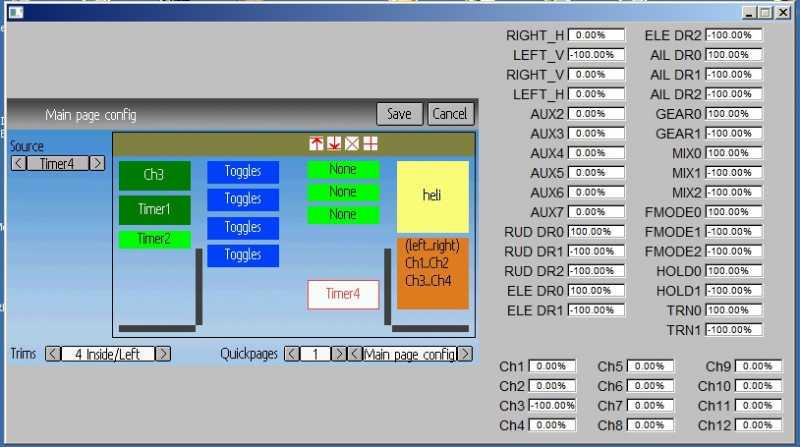
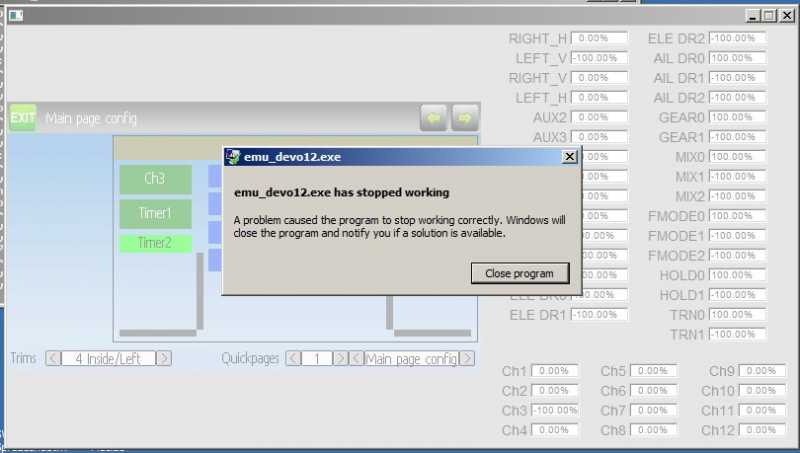
The emulator crashed when I did this:
- Clicked on new
- pressed + until I had 3 new elements (total 4)
- Moved the last element down
- Clicked on this
- Selected timer 4
Pressed "save"
- Clicked on new
- pressed + until I had 3 new elements (total 4)
- Moved the last element down
- Clicked on this
- Selected timer 4
Pressed "save"
- Pattaya01
-
- Offline
Less
More
- Posts: 181
02 Jun 2013 03:14 #10489
by Pattaya01
Replied by Pattaya01 on topic Devo12 wide screen configurable GUI (intermediate
I guess in the "Button Monitor" there should be a "V" in the white square boxes after you toggle them? But I think this is not your part of the SW.
- rbe2012
-
- Offline
- So much to do, so little time...
Less
More
- Posts: 1433
02 Jun 2013 08:02 #10492
by rbe2012
You are right, I use the original bar boxes where the bars are orientated a little left.
I will provide an optimization for this.
I can reproduce the crash, thank you for the exact steps. I will look into this.
Replied by rbe2012 on topic Devo12 wide screen configurable GUI (intermediate
(for the English speaker: the bars in a bar box are not centered).Wene001 wrote: ...im "big bars" Feld die 4 Balken nicht zentriert...
You are right, I use the original bar boxes where the bars are orientated a little left.
I will provide an optimization for this.
Also not my code, but I will look at it.Pattaya01 wrote: ...in the "Button Monitor" there should be a "V"...
I can reproduce the crash, thank you for the exact steps. I will look into this.
- Pattaya01
-
- Offline
Less
More
- Posts: 181
02 Jun 2013 10:10 #10495
by Pattaya01
Replied by Pattaya01 on topic Devo12 wide screen configurable GUI (intermediate
I love this configurable GUI, great work. Got no idea how you do this, but I admire your skills...
This is only cosmetic. I think the picture is self explaining. If I use bars for ch1...4 and another for ch5...8, as you can see, they are not aligned. Not a big issue, just doesn't look good...
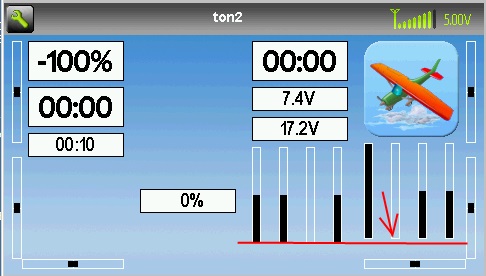
This is only cosmetic. I think the picture is self explaining. If I use bars for ch1...4 and another for ch5...8, as you can see, they are not aligned. Not a big issue, just doesn't look good...
- rbe2012
-
- Offline
- So much to do, so little time...
Less
More
- Posts: 1433
02 Jun 2013 11:38 #10498
by rbe2012
Replied by rbe2012 on topic Devo12 wide screen configurable GUI (intermediate
Thank you for your compliments.
These elements positions are dependent from those above. If you choose different elements above it can't be guaranteed that the elements are at the same y-position.
And I can not (to be honest: I don't want to) examine if in any two columns are two similar elements at nearly the same y-position to align them - there were too much special cases to watch for and the maximum offset should be defined. This would make a calculation of the element's positions much harder.
For such designs I would recommend to place the bar boxes in two columns with identical trims (visible or not) and align them at the bottom.
FYI: I have fixed the bar positions. But the reason for the crash is hard to find (I am quite near, but with fixing it I created some new bugs - I have to look for a new fix or resolve the new...).
These elements positions are dependent from those above. If you choose different elements above it can't be guaranteed that the elements are at the same y-position.
And I can not (to be honest: I don't want to) examine if in any two columns are two similar elements at nearly the same y-position to align them - there were too much special cases to watch for and the maximum offset should be defined. This would make a calculation of the element's positions much harder.
For such designs I would recommend to place the bar boxes in two columns with identical trims (visible or not) and align them at the bottom.
FYI: I have fixed the bar positions. But the reason for the crash is hard to find (I am quite near, but with fixing it I created some new bugs - I have to look for a new fix or resolve the new...).
- rbe2012
-
- Offline
- So much to do, so little time...
Less
More
- Posts: 1433
02 Jun 2013 13:00 #10500
by rbe2012
Replied by rbe2012 on topic Devo12 wide screen configurable GUI (intermediate
I have just uploaded a new version where the cause for the crash is fixed.
It has still a minimal issue (when leaving empty elements in a column the alignment is not transferred correctly when those elements are automatically removed while rebuilding), but I don't have more time actually to resolve this. But you can workaround with "save" and realign the wrong aligned element(s) and "save" again.
It has still a minimal issue (when leaving empty elements in a column the alignment is not transferred correctly when those elements are automatically removed while rebuilding), but I don't have more time actually to resolve this. But you can workaround with "save" and realign the wrong aligned element(s) and "save" again.
- Pattaya01
-
- Offline
Less
More
- Posts: 181
02 Jun 2013 15:09 #10502
by Pattaya01
Replied by Pattaya01 on topic Devo12 wide screen configurable GUI (intermediate
Yep, this one works fine.....
- cropduster
-
- Offline

Less
More
- Posts: 30
02 Jun 2013 16:55 #10503
by cropduster
Replied by cropduster on topic Devo12 wide screen configurable GUI (intermediate
Is this version just for the emulator or ready for th 12s transmitter?
- Wene001
-
- Offline
Less
More
- Posts: 277
02 Jun 2013 18:36 - 02 Jun 2013 18:40 #10505
by Wene001
Replied by Wene001 on topic Devo12 wide screen configurable GUI (intermediate
This is also ready for the 12s "live" 
I`m using it without issues
@ rbe
Eventually its an idea to create an invisible "Spacer" Box with adjustable height, so everyone can arrange the icons in any vertical position
I`m using it without issues
@ rbe
Eventually its an idea to create an invisible "Spacer" Box with adjustable height, so everyone can arrange the icons in any vertical position
Last edit: 02 Jun 2013 18:40 by Wene001.
- rbe2012
-
- Offline
- So much to do, so little time...
Less
More
- Posts: 1433
02 Jun 2013 19:48 #10506
by rbe2012
Replied by rbe2012 on topic Devo12 wide screen configurable GUI (intermediate
Good idea, Wene. I will think about this. Could be a little bit hard to implement, but surely possible. The main issue could be a minimum size to let this spacer be visible and selectable.
- Pattaya01
-
- Offline
Less
More
- Posts: 181
03 Jun 2013 00:03 #10507
by Pattaya01
Replied by Pattaya01 on topic Devo12 wide screen configurable GUI (intermediate
Another idea could be to have a "grid". So elements only move within a grid and snap on it.
- Pattaya01
-
- Offline
Less
More
- Posts: 181
03 Jun 2013 04:20 - 03 Jun 2013 04:30 #10511
by Pattaya01
Replied by Pattaya01 on topic Devo12 wide screen configurable GUI (intermediate
Guten morgen,
I found one more thing. Took me real patience to capture this in a screen shot, but after 10 times or so I managed the timing
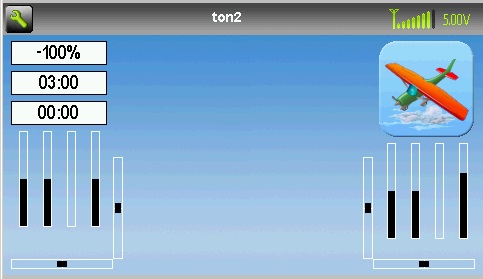
I have created "toggles", but they don't show on the screen. Even I toggle AILDR, ELEVDR, etc, they will not show.
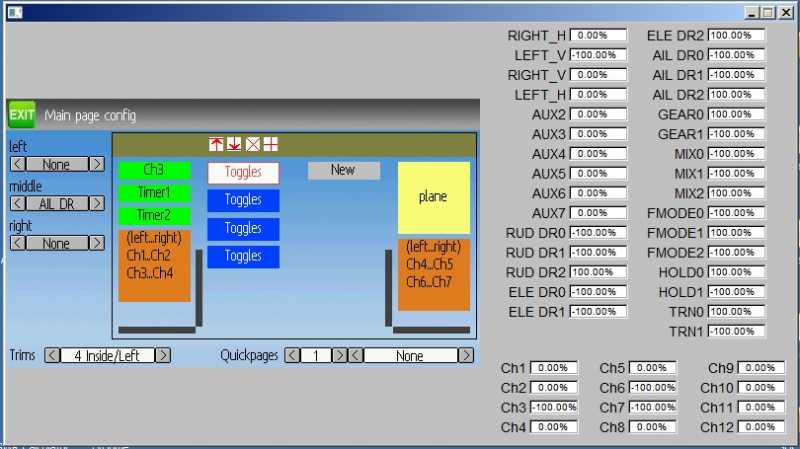
Only during start-up, these boxes with "?" show up for a split second. You can see the screen has not been build up 100%, and after all the elements are placed, they disappear.
Am I doing something wrong? Are these placemarkers? Or is it intentional?
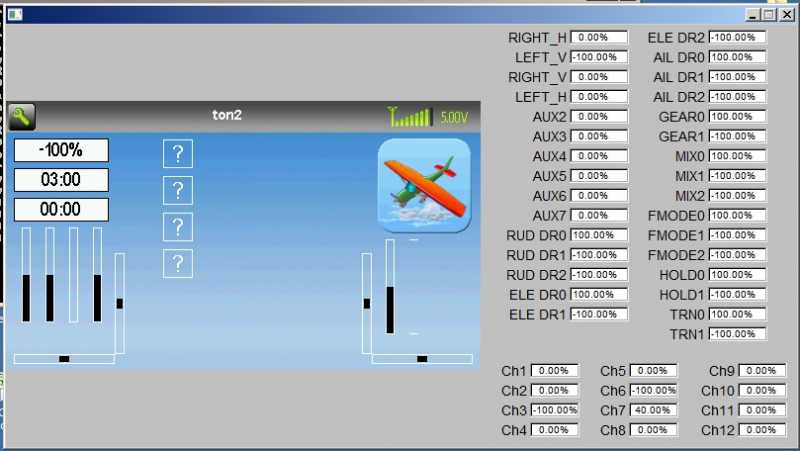
And this is how it looks after the creen has been build up completely:
I found one more thing. Took me real patience to capture this in a screen shot, but after 10 times or so I managed the timing
I have created "toggles", but they don't show on the screen. Even I toggle AILDR, ELEVDR, etc, they will not show.
Only during start-up, these boxes with "?" show up for a split second. You can see the screen has not been build up 100%, and after all the elements are placed, they disappear.
Am I doing something wrong? Are these placemarkers? Or is it intentional?
And this is how it looks after the creen has been build up completely:
Last edit: 03 Jun 2013 04:30 by Pattaya01.
- rbe2012
-
- Offline
- So much to do, so little time...
Less
More
- Posts: 1433
03 Jun 2013 05:28 #10513
by rbe2012
Replied by rbe2012 on topic Devo12 wide screen configurable GUI (intermediate
The toggle thing is a little bit complicated. They are set to these question mark you have seen when the gui objects are initialized. Later they were set to the correct icons / are set to be invisible depending on the switch. This is the way all deviation version handle them.
I have seen this too and I don't like it, but I have not changed the code there.
I will try to set them invisible when initializing. Maybe that helps.
A grid is an interesting idea, but it will reduce the abilities to place the elements on the screen. The main problem is the different element height and the need for some free space as separators. Grids would force those separator spaces to specific positions and the freedom for using elements will be limited.
I think implementing such a grid will also be hard. There will be more special cases handled and more limit calculation done. For me I have always found a way to design a symmetric and nice screen with the information I want to have.
So: sorry, but I will not implement such a grid. I do like more the idea of Wene about placeholders with configurable size. I will give this a try.
I have seen this too and I don't like it, but I have not changed the code there.
I will try to set them invisible when initializing. Maybe that helps.
A grid is an interesting idea, but it will reduce the abilities to place the elements on the screen. The main problem is the different element height and the need for some free space as separators. Grids would force those separator spaces to specific positions and the freedom for using elements will be limited.
I think implementing such a grid will also be hard. There will be more special cases handled and more limit calculation done. For me I have always found a way to design a symmetric and nice screen with the information I want to have.
So: sorry, but I will not implement such a grid. I do like more the idea of Wene about placeholders with configurable size. I will give this a try.
Time to create page: 0.316 seconds
-
Home

-
Forum
-
Development
-
Builds
- Devo12 wide screen configurable GUI (intermediate