
- Posts: 3
Please help to edit menu screen (photo inside)
- saitek
-
Topic Author
- Offline
Less
More
02 Aug 2014 13:44 - 03 Aug 2014 05:04 #24969
by saitek
Please help to edit menu screen (photo inside) was created by saitek
Have anyone know the folder path to edit this screen. i want to move model word (red circle in picture) from center to left side.

Last edit: 03 Aug 2014 05:04 by saitek.
- D_an_W
-
- Offline

Less
More
- Posts: 101
02 Aug 2014 15:06 #24972
by D_an_W
*** Walkera Devo 10 * 4-in-1 Module * Deviation v5 *** *** Walkera Devo 7E * A7105 Module * 2x 3 Way Switches * Power Mod * Deviation v5 ***
Replied by D_an_W on topic Please help to edit menu screen (photo inside)
Attach the ini file you are using (Model1.ini maybe?) and I will see if I can help, I am still learning Deviation but I think I can do that if it's the same as the 7E
*** Walkera Devo 10 * 4-in-1 Module * Deviation v5 *** *** Walkera Devo 7E * A7105 Module * 2x 3 Way Switches * Power Mod * Deviation v5 ***
- sbstnp
-
- Offline

Less
More
- Posts: 649
02 Aug 2014 16:19 #24976
by sbstnp
Devo 10 + 4in1
Spektrum Dx9
FrSky Taranis + TBS Crossfire
Replied by sbstnp on topic Please help to edit menu screen (photo inside)
I think you want media/config.ini
Find the entry for [font-modelname] and change:
box_type=left
The change will be system wide.
Find the entry for [font-modelname] and change:
box_type=left
The change will be system wide.
Devo 10 + 4in1
FrSky Taranis + TBS Crossfire
- saitek
-
- Offline
Less
More
- Posts: 3
02 Aug 2014 17:55 #24979
by saitek
Replied by saitek on topic Please help to edit menu screen (photo inside)
This is a problem when more text.
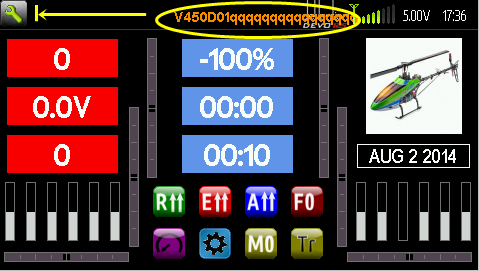
I want to move to a position according to the picture.
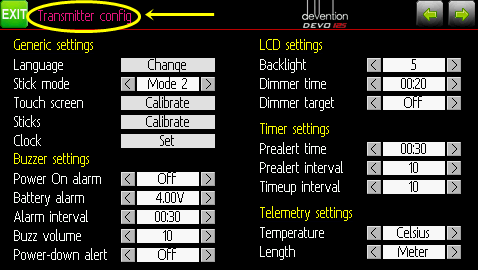
I want to move to a position according to the picture.
- FDR
-
- Offline

02 Aug 2014 18:27 #24980
by FDR
This won't move the box to the far left, just arrange the model name to the left in it's box...
@saitek:
Why do you need that many "q" in your model name?
Rather clear that devention DEVO 12 text from the background image, and you will have plenty of place for the model name...
Replied by FDR on topic Please help to edit menu screen (photo inside)
sbstnp wrote: I think you want media/config.ini
Find the entry for [font-modelname] and change:
box_type=left
The change will be system wide.
This won't move the box to the far left, just arrange the model name to the left in it's box...
@saitek:
Why do you need that many "q" in your model name?
Rather clear that devention DEVO 12 text from the background image, and you will have plenty of place for the model name...
- sbstnp
-
- Offline
Less
More
- Posts: 649
02 Aug 2014 18:37 #24982
by sbstnp
Devo 10 + 4in1
Spektrum Dx9
FrSky Taranis + TBS Crossfire
Replied by sbstnp on topic Please help to edit menu screen (photo inside)
@fdr yes, aware of that. incomplete instructions  he needs to redo the layout as well.
@saitek use shorter names.
he needs to redo the layout as well.@saitek use shorter names.
Devo 10 + 4in1
FrSky Taranis + TBS Crossfire
- saitek
-
- Offline
Less
More
- Posts: 3
02 Aug 2014 20:00 #24984
by saitek
Replied by saitek on topic Please help to edit menu screen (photo inside)
It's just a sample. Normally it is not named this long. Just think it is pretty good for me.
Time to create page: 0.203 seconds
-
Home

-
Forum
-
Model Configs, Templates, Skins
-
Custom Skins
- Please help to edit menu screen (photo inside)