
- Posts: 799
XK X100 3D quad config for 7E and D10/D8
- dc59
-
Topic Author
- Offline
Less
More
08 Jun 2016 07:18 - 18 Jun 2016 23:50 #50162
by dc59
XK X100 3D quad config for 7E and D10/D8 was created by dc59
Note : Need 3 way switch mod.
DEVO 7E
HOLD1 : Throttle Hold
SW A0 : 6G mode , can not flip / invert fly
SW A1 : 3D mode
FMOD0 : Normal can not invert fly.
FMOD1 : 3D invert fly
DEVO 10/8
RUD DR1 : Throttle Hold
ELE DR0 : 6G mode , can not flip / invert fly
ELE DR1 : 3D mode
FMOD0 : Normal can not invert fly.
FMOD1 : 3D invert fly
2016/6/19 bug fix version, old setting file has a bug with 6G mode + FMod1,it's fixed.
DEVO 7E
HOLD1 : Throttle Hold
SW A0 : 6G mode , can not flip / invert fly
SW A1 : 3D mode
FMOD0 : Normal can not invert fly.
FMOD1 : 3D invert fly
DEVO 10/8
RUD DR1 : Throttle Hold
ELE DR0 : 6G mode , can not flip / invert fly
ELE DR1 : 3D mode
FMOD0 : Normal can not invert fly.
FMOD1 : 3D invert fly
2016/6/19 bug fix version, old setting file has a bug with 6G mode + FMod1,it's fixed.
Last edit: 18 Jun 2016 23:50 by dc59.
- tieff72
-
- Offline

Less
More
- Posts: 2
10 Jun 2016 02:26 #50300
by tieff72
Replied by tieff72 on topic XK X100 3D quad config for 7E
how to bind xk x100?
i can not bind to xk x100.
I choose S-FHSS protocol. changing bind button to RE-INIT button.
i push RE-INIT Button. but no action and can not biding.
please help me.
i can not bind to xk x100.
I choose S-FHSS protocol. changing bind button to RE-INIT button.
i push RE-INIT Button. but no action and can not biding.
please help me.
- dc59
-
- Offline
Less
More
- Posts: 799
10 Jun 2016 03:44 #50304
by dc59
Replied by dc59 on topic XK X100 3D quad config for 7E
Follow next steps:
1, Setup model file and protocol on your TX first, power >= 30mw for first binding, put TX as close as quads ,then reboot your TX.
2, power on X100 quads, red and blue both LED should ON and soild.
3, 'press and hold' bind button on the X100 (rear right side of quad)
4, then BLUE LED will go off (RED LED still on and solid) , release bind button now.
5, wait for BLUE LED ON and soild again and then GREEN LED will ON and solid almost at same time.
Done!
1, Setup model file and protocol on your TX first, power >= 30mw for first binding, put TX as close as quads ,then reboot your TX.
2, power on X100 quads, red and blue both LED should ON and soild.
3, 'press and hold' bind button on the X100 (rear right side of quad)
4, then BLUE LED will go off (RED LED still on and solid) , release bind button now.
5, wait for BLUE LED ON and soild again and then GREEN LED will ON and solid almost at same time.
Done!
- tieff72
-
- Offline
Less
More
- Posts: 2
10 Jun 2016 07:05 #50316
by tieff72
Replied by tieff72 on topic XK X100 3D quad config for 7E
Of way about you but it does not become binding.
Maybe CC2500 module is disfective.
thak you so much.
Maybe CC2500 module is disfective.
thak you so much.
- dc59
-
- Offline
Less
More
- Posts: 799
10 Jun 2016 08:37 #50319
by dc59
Regarding S-FHSS protocol , there are still some problem about frequency shifting issue, maybe you should take a look at this post first.
www.deviationtx.com/forum/builds/5569-xk...o-10?start=100#48248
Replied by dc59 on topic XK X100 3D quad config for 7E
tieff72 wrote: Of way about you but it does not become binding.
Maybe CC2500 module is disfective.
thak you so much.
Regarding S-FHSS protocol , there are still some problem about frequency shifting issue, maybe you should take a look at this post first.
www.deviationtx.com/forum/builds/5569-xk...o-10?start=100#48248
- dc59
-
- Offline
Less
More
- Posts: 799
18 Jun 2016 23:51 #50786
by dc59
Replied by dc59 on topic XK X100 3D quad config for 7E and D10/D8
Config file has been updated.
- Quadman
-
- Offline

Less
More
- Posts: 21
12 Jan 2017 16:15 #57851
by Quadman
Replied by Quadman on topic XK X100 3D quad config for 7E and D10/D8
To anyone who maybe interested this ini file also works for XK X251. I have Devo 7E with 3 in 1 module and range mod + 2 added 3 way switches.
I was able to bind it to the 251 using this ini file.
WARNING: do not use FMODE1 as this is for inverted flight for the x100 and the 251 is not compatible.
At this point I would like to point out that I am a Newb and as such am not fully familiar to deviation however I have managed to bind 6 of my quads, 5 of which I have done manually, I have also managed to edit them using the advanced GUI to give them the flight characteristics I desired But I have much to learn and am very keen.
QUESTION: Actually this is kind of 2 questions in one.
(A) As the XK X252 fly's all the same characteristic's as the X100 including inverted flight I take it that this ini file should work fine with it? And if this is the case maybe someone with better programing skills than myself could take this file as a starting point and add the camera features of the x252?
( Would it be possible to edit the channel controlling the FMODE1 switch on the original X100 ini to take out the inverted section, thus producing a safer file for the X251?
I was able to bind it to the 251 using this ini file.
WARNING: do not use FMODE1 as this is for inverted flight for the x100 and the 251 is not compatible.
At this point I would like to point out that I am a Newb and as such am not fully familiar to deviation however I have managed to bind 6 of my quads, 5 of which I have done manually, I have also managed to edit them using the advanced GUI to give them the flight characteristics I desired But I have much to learn and am very keen.
QUESTION: Actually this is kind of 2 questions in one.
(A) As the XK X252 fly's all the same characteristic's as the X100 including inverted flight I take it that this ini file should work fine with it? And if this is the case maybe someone with better programing skills than myself could take this file as a starting point and add the camera features of the x252?
(
Would it be possible to edit the channel controlling the FMODE1 switch on the original X100 ini to take out the inverted section, thus producing a safer file for the X251? - Quadman
-
- Offline
Less
More
- Posts: 21
12 Jan 2017 18:24 #57854
by Quadman
Replied by Quadman on topic XK X100 3D quad config for 7E and D10/D8
Just a quick add on to my earlier post regarding the XK X251 when binding to the Devo 7E you will need to put aircraft into bind mode. Look to the undercarriage opposite the camera port there is an elliptical hole, give power to the X251 and using a small gauge screwdriver press the small black button inside the hole for 2 seconds or until the green light goes out, you are now in bind mode. Be sure TH>1.
On the Devo 7E scroll down to protocol menu.
S-FHSS Press Enter.
Fine Frequency>-21
Coarse Frequency>0
Hope this helps.
On the Devo 7E scroll down to protocol menu.
S-FHSS Press Enter.
Fine Frequency>-21
Coarse Frequency>0
Hope this helps.
- Danik
-
- Offline

Less
More
- Posts: 11
20 Mar 2017 07:44 #60395
by Danik
Replied by Danik on topic XK X100 3D quad config for 7E and D10/D8
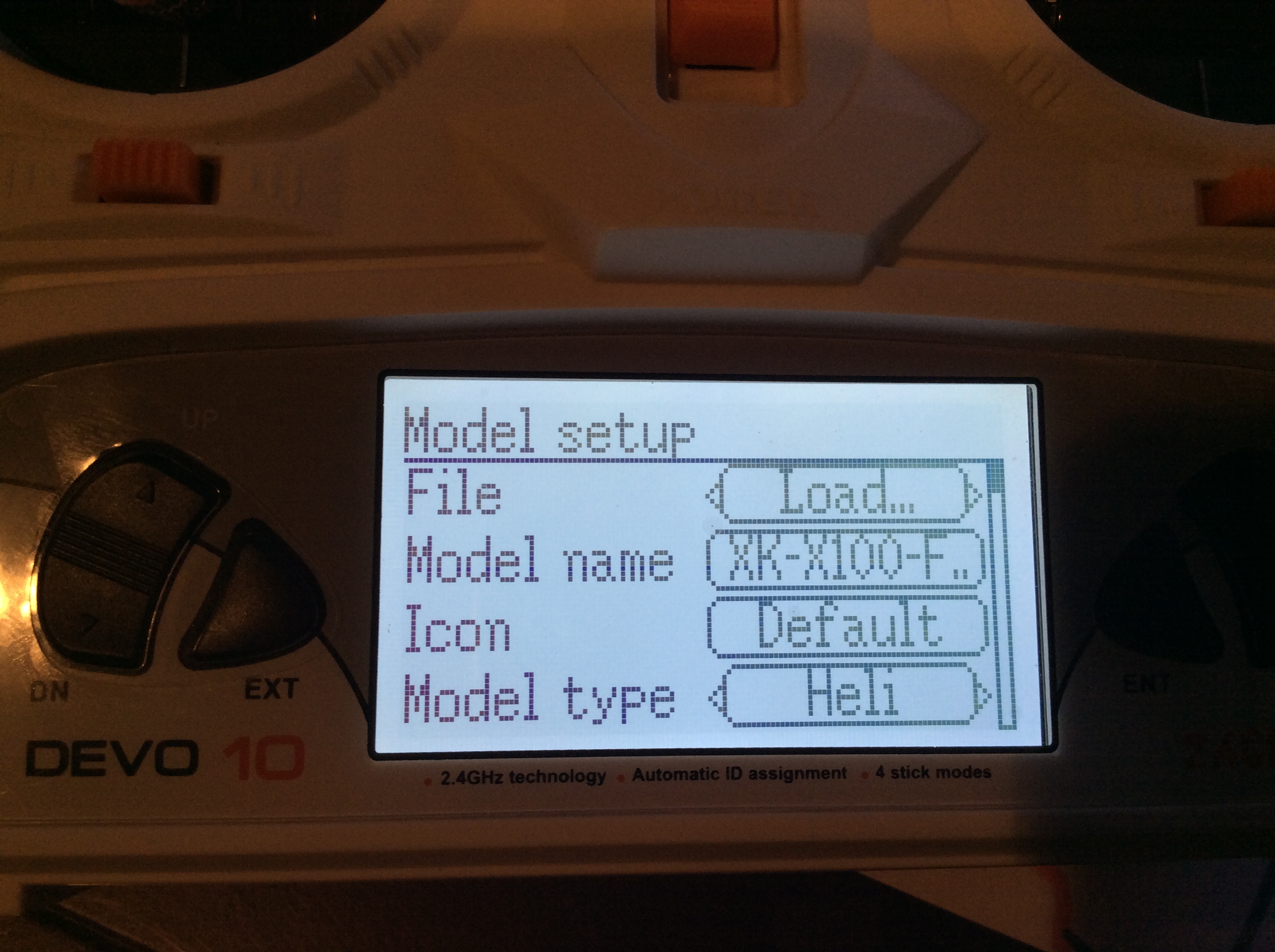
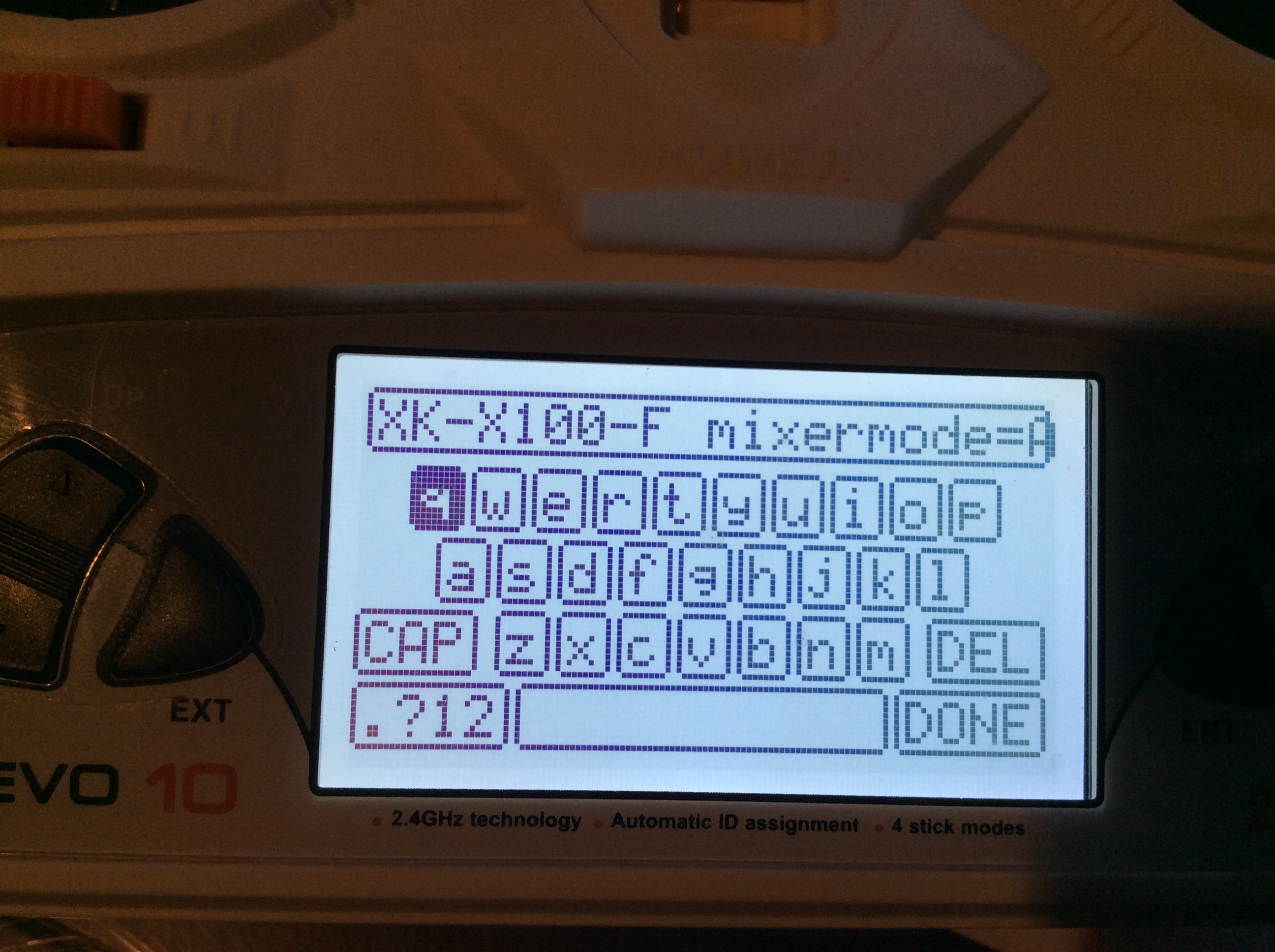
Ok. I downloaded the ini file (copy and texted) the contents into the models folder i.e. My model #4 now has the new ini file.
Devo 10 cannot read the file correctly. All the stuff from the INI file goes into the name of the quad. See attached.
What am I doing wrong?
Devo 10 cannot read the file correctly. All the stuff from the INI file goes into the name of the quad. See attached.
What am I doing wrong?
- Deal57
-
- Offline

Less
More
- Posts: 857
21 Mar 2017 15:03 #60479
by Deal57
Deviation Devo7e 3way switch mod, A7105, NRF24L01
Devo6s 2x2 switch mod, trim mod, haptic, multimodule, A7105, NRF24L01, CC2500
Devo12e 4-in-1 with voice mod -- it speaks!!
Replied by Deal57 on topic XK X100 3D quad config for 7E and D10/D8
The Windows Notepad app doesn't edit these files correctly. You need to use an editor like Notepad++ so that the line ends are kept correctly.
Deviation Devo7e 3way switch mod, A7105, NRF24L01
Devo6s 2x2 switch mod, trim mod, haptic, multimodule, A7105, NRF24L01, CC2500
Devo12e 4-in-1 with voice mod -- it speaks!!
- Danik
-
- Offline
Less
More
- Posts: 11
21 Mar 2017 15:30 #60480
by Danik
Replied by Danik on topic XK X100 3D quad config for 7E and D10/D8
Thku!
- Quadman
-
- Offline
Less
More
- Posts: 21
22 Mar 2017 02:40 #60496
by Quadman
Replied by Quadman on topic XK X100 3D quad config for 7E and D10/D8
Don't forget once you open the file with notepad++ just go to language tab and select language tab scroll down to ini and select then your save file will be edited into recognisable ini format .either select all or copy past to a new folder, or txt document ,then it will load to your Devo 10:woohoo:
- mmccaule
-
- Offline

Less
More
- Posts: 2
10 Apr 2017 20:13 #61362
by mmccaule
Replied by mmccaule on topic XK X100 3D quad config for 7E and D10/D8
Do you know if this .ini will work with the X252?
- Quadman
-
- Offline
Less
More
- Posts: 21
29 Apr 2017 00:59 #61837
by Quadman
Replied by Quadman on topic XK X100 3D quad config for 7E and D10/D8
I would imagine the basic parameters for the Ini should be compatible however some channels may need a little wok, the main concern is the camer function as this would need assigning to a switch or a virtual channel.

- mmccaule
-
- Offline
Less
More
- Posts: 2
29 Apr 2017 01:28 #61838
by mmccaule
Replied by mmccaule on topic XK X100 3D quad config for 7E and D10/D8
Thanks for the info. I'll have to get it a try.
- JayDrone
-
- Offline

Less
More
- Posts: 85
25 Sep 2018 20:42 #71039
by JayDrone
Replied by JayDrone on topic XK X100 3D quad config for 7E and D10/D8
I have this model bound to the jumper t8sg and am wondering the chnnel maping
- C0ckpitvue 777
-
- Offline

Less
More
- Posts: 409
26 Sep 2018 00:05 #71040
by C0ckpitvue 777
Follow this thread it's for the devos but same scenario...
www.deviationtx.com/forum/model-configs/...-7e-and-d10-d8#57854
Replied by C0ckpitvue 777 on topic XK X100 3D quad config for 7E and D10/D8
JayDrone wrote: I have this model bound to the jumper t8sg and am wondering the chnnel maping
Follow this thread it's for the devos but same scenario...
www.deviationtx.com/forum/model-configs/...-7e-and-d10-d8#57854
Time to create page: 0.257 seconds
-
Home

-
Forum
-
Model Configs, Templates, Skins
-
Model Configs
- XK X100 3D quad config for 7E and D10/D8