
- Posts: 88
- Forum
- News, Announcements and Feedback
- Feedback & Questions
- 7e toggle icons/object positions on main screen
7e toggle icons/object positions on main screen
- skretchmer
-
Topic Author
- Offline
Less
More
14 Aug 2015 00:09 #36856
by skretchmer
7e toggle icons/object positions on main screen was created by skretchmer
Is there a good manual about the toggle icons and positioning objects on the main screen for the 7e? The 7e/10 manual herein is not correct by far, the icon list is half correct at best, and the statements about screen positioning are incorrect. By editing the model file in windows you can put any object anywhere you want on the screen. Any object type can be placed anywhere by using a grid numbering system. It would be useful to have a correct icon numbering chart, and a bit-map for size of different object types for planning out the layout.
- greenfly
-
- Offline

14 Aug 2015 00:51 #36857
by greenfly
Replied by greenfly on topic 7e toggle icons/object positions on main screen
I have not seen anything like that. It would be nice though. Maybe we can add another appendix to the manual. I have learned the most by seeing what other people do in their model files, but I guess the ultimate way to know is to look at the code and the bitmaps themselves.
- Epyon
-
- Offline

Less
More
- Posts: 57
14 Aug 2015 01:26 #36858
by Epyon
Replied by Epyon on topic 7e toggle icons/object positions on main screen
I enjoy modding the crap out of my main screens. A few random, useful tidbits: 27 is the max number of items (toggle icons, boxes, bar graphs, trims, etc.) you can have. Well actually 28 if you count the model name. Speaking of the model name, you can not move or remove it. You can however, layer things over top of it. You must space them 1 pixel over and 1 pixel down or the model name shows over top for some reason. As far as toggle icons, you need a 1 pixel space all around them or they'll blank a pixel column/row of whatever is next to it. I use a lot of 2/3/4 piece icons I just work the blank space into the design and put the toggles right up against one another.
Icon numbering, I can't help on. I've never even attempted to match the ordering.
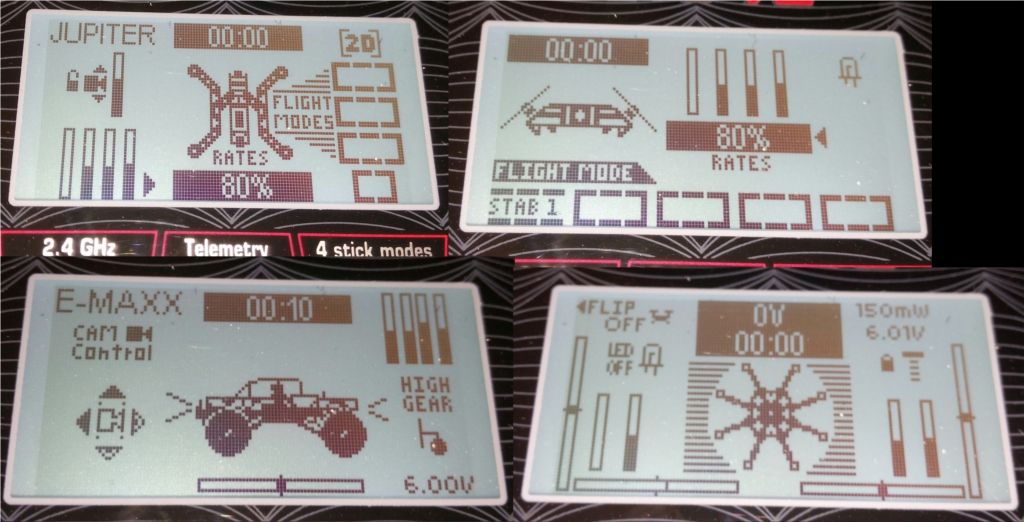
Here are a few of my model.ini's, and corresponding toggle.bmp's.
BACK UP! yours first if you're gonna try anything.
Icon numbering, I can't help on. I've never even attempted to match the ordering.

Here are a few of my model.ini's, and corresponding toggle.bmp's.
BACK UP! yours first if you're gonna try anything.
- mwm
-
- Offline

14 Aug 2015 04:00 #36861
by mwm
Do not ask me questions via PM. Ask in the forums, where I'll answer if I can.
My remotely piloted vehicle ("drone") is a yacht.
Replied by mwm on topic 7e toggle icons/object positions on main screen
Can you please provide more detail about the problems with the manual than "not correct"? Starting with whether you're using the manual linked to in the menu on the left, or a PDF download? If you do, I'll fix them. Or if you'd rather, I can show you how to submit corrections that we can incorporate directly.
Do not ask me questions via PM. Ask in the forums, where I'll answer if I can.
My remotely piloted vehicle ("drone") is a yacht.
- greenfly
-
- Offline
14 Aug 2015 21:34 #36889
by greenfly
Replied by greenfly on topic 7e toggle icons/object positions on main screen
The online manual seems correct but, there is still a deficit of information needed to manual configure the Main Page layout. Section 9.7 is a good start for what is available, but more technical information is needed to actually manipulate the GUI section correctly.
We need to know things like the keywords for all the objects, the values needed for each object, the size of the objects, etc...
[gui-128x64]
V-trim=55,10,1
H-trim=1,59,3
V-trim=69,10,2
H-trim=78,59,4
Big-box=2,26,Ch1
Small-box=2,39,Timer1
Small-box=2,48,Timer2
Bargraph=79,30,Ch1
Bargraph=85,30,Ch2
...
We need to know things like the keywords for all the objects, the values needed for each object, the size of the objects, etc...
- mwm
-
- Offline
15 Aug 2015 01:21 #36896
by mwm
Do not ask me questions via PM. Ask in the forums, where I'll answer if I can.
My remotely piloted vehicle ("drone") is a yacht.
Replied by mwm on topic 7e toggle icons/object positions on main screen
Ah, the manual generally doesn't cover what's in the model file, and that's on purpose. You're supposed to use the GUI for that. I added a section on Safety issues, because I got tired of dealing with problems with it in the forums. Looks like Hexfet may have fixed the primary source of problems as well.
I guess the 7E needs a section for GUI manipulation. Possibly that should be in a wiki page. But it's not something I can write.
Thanks.
I guess the 7E needs a section for GUI manipulation. Possibly that should be in a wiki page. But it's not something I can write.
Thanks.
Do not ask me questions via PM. Ask in the forums, where I'll answer if I can.
My remotely piloted vehicle ("drone") is a yacht.
- skretchmer
-
- Offline
Less
More
- Posts: 88
15 Aug 2015 01:40 #36898
by skretchmer
Replied by skretchmer on topic 7e toggle icons/object positions on main screen
9.7.1. Configuring object position
Note: This feature is not available for Devo7e.
the ability to do lots of screen customization in the 7e via the .ini file, is available, but the manual does not show this, or give the details as what greenfly said.
Epyon- your stuff looks way cool, and is much more advanced than I would ever try. I was happy with having bar graphs for all 8 channels, and the battery voltage where I wanted it.
Note: This feature is not available for Devo7e.
the ability to do lots of screen customization in the 7e via the .ini file, is available, but the manual does not show this, or give the details as what greenfly said.
Epyon- your stuff looks way cool, and is much more advanced than I would ever try. I was happy with having bar graphs for all 8 channels, and the battery voltage where I wanted it.
- greenfly
-
- Offline
15 Aug 2015 03:47 #36904
by greenfly
I didn't know my 7E even supported bar graphs for channels... until I downloaded someone's hand-edited model file. The configurable GUI is a great feature, why not promote it's use? Even if it's just for "power users"...
Replied by greenfly on topic 7e toggle icons/object positions on main screen
skretchmer wrote: ... I was happy with having bar graphs for all 8 channels, and the battery voltage where I wanted it.
I didn't know my 7E even supported bar graphs for channels... until I downloaded someone's hand-edited model file. The configurable GUI is a great feature, why not promote it's use? Even if it's just for "power users"...
- mwm
-
- Offline
15 Aug 2015 05:55 #36908
by mwm
Do not ask me questions via PM. Ask in the forums, where I'll answer if I can.
My remotely piloted vehicle ("drone") is a yacht.
Replied by mwm on topic 7e toggle icons/object positions on main screen
Well, there's an entire section on how to configure the main screen in the the manual. But it covers doing it on the Tx, which is one of the features you lose with the 7E. Much as I'm a CLI kind of guy, configuring the GUI is a lot easier on the Tx. If I still had a 7E, I'd probably do the GUI config in the devo10 emulator, and then copy it over to my models. That way, everything is documented.
Do not ask me questions via PM. Ask in the forums, where I'll answer if I can.
My remotely piloted vehicle ("drone") is a yacht.
- robca
-
- Offline

Less
More
- Posts: 174
15 Aug 2015 10:30 #36910
by robca
Replied by robca on topic 7e toggle icons/object positions on main screen
Would it be viable to edit a screen on a Devo 10 emulator and then upload the ini to a Devo 7e?
If not, would it be possible to enable the main screen configurator on the Devo 7e emulator (which I assume does not suffer from the memory limitations of the real HW)?
Judging by the traffic on forums, the #1 platform for the Deviation is the 7e (I might be wrong, but that's my impression), so offering some ways of doing it would be nice.
Otherwise someone needs to create a GUI for it
If not, would it be possible to enable the main screen configurator on the Devo 7e emulator (which I assume does not suffer from the memory limitations of the real HW)?
Judging by the traffic on forums, the #1 platform for the Deviation is the 7e (I might be wrong, but that's my impression), so offering some ways of doing it would be nice.
Otherwise someone needs to create a GUI for it
- mwm
-
- Offline
15 Aug 2015 12:33 #36912
by mwm
Same screen, same controls, so it ought to work fine. That's why I suggested it. The one issue is that the switches are different, so you'd have to change the toggle icon settings later. Or use my switch converter utility.
Sure. Not clear doing that in the release will ever fly, but you can get a test build here: deviationtx.com/downloads-new/category/2...m-devo7elayouteditor
Do not ask me questions via PM. Ask in the forums, where I'll answer if I can.
My remotely piloted vehicle ("drone") is a yacht.
Replied by mwm on topic 7e toggle icons/object positions on main screen
robca wrote: Would it be viable to edit a screen on a Devo 10 emulator and then upload the ini to a Devo 7e?
Same screen, same controls, so it ought to work fine. That's why I suggested it. The one issue is that the switches are different, so you'd have to change the toggle icon settings later. Or use my switch converter utility.
If not, would it be possible to enable the main screen configurator on the Devo 7e emulator (which I assume does not suffer from the memory limitations of the real HW)?
Sure. Not clear doing that in the release will ever fly, but you can get a test build here: deviationtx.com/downloads-new/category/2...m-devo7elayouteditor
Do not ask me questions via PM. Ask in the forums, where I'll answer if I can.
My remotely piloted vehicle ("drone") is a yacht.
- robca
-
- Offline
Less
More
- Posts: 174
15 Aug 2015 13:22 #36913
by robca
 )
)
Replied by robca on topic 7e toggle icons/object positions on main screen
That's awesome, thanks! (where's the "bowing to your greatness" emoticon when you need it?mwm wrote:
If not, would it be possible to enable the main screen configurator on the Devo 7e emulator (which I assume does not suffer from the memory limitations of the real HW)?
Sure. Not clear doing that in the release will ever fly, but you can get a test build here: deviationtx.com/downloads-new/category/2...m-devo7elayouteditor
) - Forum
- News, Announcements and Feedback
- Feedback & Questions
- 7e toggle icons/object positions on main screen
Time to create page: 0.124 seconds
-
Home

-
Forum
-
News, Announcements and Feedback
-
Feedback & Questions
- 7e toggle icons/object positions on main screen