
Need testers for USBcode
- mwm
-
- Offline

Less
More
29 Apr 2015 12:34 #31797
by mwm
Do not ask me questions via PM. Ask in the forums, where I'll answer if I can.
My remotely piloted vehicle ("drone") is a yacht.
Replied by mwm on topic Need testers for USBcode
Any chance we could get "Backup" and "Restore" options, that would automatically backup the file system, or select portions of it, and later restore them as well? That would encourage people to actually do those backups when installing a new version.
Do not ask me questions via PM. Ask in the forums, where I'll answer if I can.
My remotely piloted vehicle ("drone") is a yacht.
- PhracturedBlue
-
Topic Author
- Offline
Less
More
- Posts: 4403
24 May 2015 01:49 #32906
by PhracturedBlue
Replied by PhracturedBlue on topic Need testers for USBcode
I'm going to start working on the issues listed above soon. Now that the F12E is supported, We need to have the deviation-uploader working since the Walkera uploader doesn't work well with the DevoFS filesystem.
Before I could do that, I needed an easy way to setup the driver in Windows. This proved to be very challenging because:
(a) my code uses libusb and Walkera's uses a custom USB driver, and you can't have both installed at the same time. I needed a way to switch between them so users could go back to the Walkera driver if needed
(b) Windows 8 requires signed drivers. Creating one is a pain and costs ~$200
(c) solutions that work on Windows 8 don't work on WinXP
(d) I needed something easy to use
In the end, the solution isn't very elegant, but it works pretty well. I wrote an ayutohotkey script which can uninstall existing drivers and install either the STMicro/Walkera driver or a libusb driver using zadig. It makes it easy to switch between drivers with the press of a button. Zadig comes precompiled as a gui only app (there is a text mode but it sin't released as a binary and I wasn't able to get the toolchain fuctional to build it), so I use autohotkey to automate the navigation through the gui. I also added code to properly uninstall the drivers which wasn't as easy as I'd have hoped.
Anyhow, here is the zip:
www.deviationtx.com/downloads-new/catego...usbdrv-installer-1-0
It should work on Windows-XP through Windows8.1 and should only require unzipping and running the exe. You will need Administrator access of course to install the drivers.
Note that the actual DfuSe utitility (and the Deviation-Uploader) are not included. These can both be installed at the same time though, so there is no need to remove/reinstall them to switch between the 2.
Before I could do that, I needed an easy way to setup the driver in Windows. This proved to be very challenging because:
(a) my code uses libusb and Walkera's uses a custom USB driver, and you can't have both installed at the same time. I needed a way to switch between them so users could go back to the Walkera driver if needed
(b) Windows 8 requires signed drivers. Creating one is a pain and costs ~$200
(c) solutions that work on Windows 8 don't work on WinXP
(d) I needed something easy to use
In the end, the solution isn't very elegant, but it works pretty well. I wrote an ayutohotkey script which can uninstall existing drivers and install either the STMicro/Walkera driver or a libusb driver using zadig. It makes it easy to switch between drivers with the press of a button. Zadig comes precompiled as a gui only app (there is a text mode but it sin't released as a binary and I wasn't able to get the toolchain fuctional to build it), so I use autohotkey to automate the navigation through the gui. I also added code to properly uninstall the drivers which wasn't as easy as I'd have hoped.
Anyhow, here is the zip:
www.deviationtx.com/downloads-new/catego...usbdrv-installer-1-0
It should work on Windows-XP through Windows8.1 and should only require unzipping and running the exe. You will need Administrator access of course to install the drivers.
Note that the actual DfuSe utitility (and the Deviation-Uploader) are not included. These can both be installed at the same time though, so there is no need to remove/reinstall them to switch between the 2.
- PhracturedBlue
-
- Offline
Less
More
- Posts: 4403
30 May 2015 16:42 #33247
by PhracturedBlue
Replied by PhracturedBlue on topic Need testers for USBcode
I have uploaded a new version of the Java DFU uploader. I have rewritten a huge amount of the underlying code (though the interface remains the same). This is now the only supported way to install Deviation on the F12E. It may soon be the only way to install on the Devo7E as well, so I'd really like it if others could test it out.
You will need Java installed before proceeding.
I'll make a step-by-step set of instructions sooner or later, but it is pretty straight forward to use
Assuming you are on Windows, you need to 1st download:
www.deviationtx.com/downloads-new/catego...usbdrv-installer-1-0
Unzip, and run it.
Select 'Install Deviation USB driver', and Press 'Install'
Now download the latest version of the 'DeviationUpload' tool from here (currently 0.7.0):
www.deviationtx.com/downloads-new/category/161-dfu-usb-tool
Run the java program, and a GUI should appear.
plug in your Tx, and turn it on in programming mode, and it should be detected by the Uploader app.
Now press '...' by 'Filename' and selectthe zip file with your firmware (you do not need to unzip the firmware 1st!)
If this is the 1st time installing Deviation, you should select 'Format Root'
Press 'Install/Upgrade' and after some time the install should complete and you should be ready to go.
If you want to go back to using the Walkera installer, run the USBDrv install script again, and select 'Install Walkera USB driver'
You will need Java installed before proceeding.
I'll make a step-by-step set of instructions sooner or later, but it is pretty straight forward to use
Assuming you are on Windows, you need to 1st download:
www.deviationtx.com/downloads-new/catego...usbdrv-installer-1-0
Unzip, and run it.
Select 'Install Deviation USB driver', and Press 'Install'
Now download the latest version of the 'DeviationUpload' tool from here (currently 0.7.0):
www.deviationtx.com/downloads-new/category/161-dfu-usb-tool
Run the java program, and a GUI should appear.
plug in your Tx, and turn it on in programming mode, and it should be detected by the Uploader app.
Now press '...' by 'Filename' and selectthe zip file with your firmware (you do not need to unzip the firmware 1st!)
If this is the 1st time installing Deviation, you should select 'Format Root'
Press 'Install/Upgrade' and after some time the install should complete and you should be ready to go.
If you want to go back to using the Walkera installer, run the USBDrv install script again, and select 'Install Walkera USB driver'
- Durete
-
- Offline

Less
More
- Posts: 610
30 May 2015 22:41 - 30 May 2015 22:42 #33270
by Durete
Replied by Durete on topic Need testers for USBcode
Just tried to use your USB Driver installer. As soon I try execute gives me a compatibility error related with win32/64.
I'm using Win7 32bits. I tried with and without administrator rights.
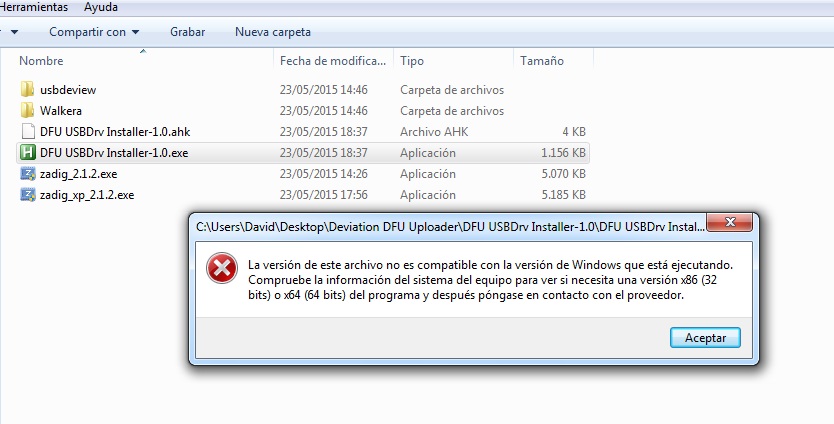
I'm using Win7 32bits. I tried with and without administrator rights.
Last edit: 30 May 2015 22:42 by Durete.
- PhracturedBlue
-
- Offline
Less
More
- Posts: 4403
31 May 2015 02:06 #33271
by PhracturedBlue
Replied by PhracturedBlue on topic Need testers for USBcode
Try this one instead. It is just the 32bit exe, you need to copy the exe to the directory from the 1.0 zip file
- stevecox
-
- Offline
- Keep swinging

31 May 2015 06:28 #33273
by stevecox
Adelaide
Replied by stevecox on topic Need testers for USBcode
Windows 10 Pro Insider Preview Build 10130 - 32 bit, usb installer doesn't seem to do anything. Unblocked it, changed permissions and tried various compatibility but doesn't seem to do anything after I hit install - even after manually uninstalling dfuse to see if it made a difference. Java version 8 update 45, the java file doesn't seem to load completely, also after unblocking etc, this may be as a result of the usb not installing. I get the window but its blank on the inside. It's not serious for me atm, I have other pc's with older M$'s and a Debian box, this was more for your info sake.
Adelaide
- victzh
-
- Offline

Less
More
- Posts: 1386
31 May 2015 07:20 #33274
by victzh
Replied by victzh on topic Need testers for USBcode
Worked for me - checked Devo 10 (will check others I have tomorrow), Windows 8.1 64-bit. The only problem - I have high DPI display and everything is so small!
- PhracturedBlue
-
- Offline
Less
More
- Posts: 4403
31 May 2015 12:41 #33278
by PhracturedBlue
Replied by PhracturedBlue on topic Need testers for USBcode
steve,
To be clear, you downloaded both the 1.0zip and the .32.zip unziupped both int ot he same directory, and ran the DFU Installer.32.exe?
Can you try to run the 'zadig_2_1_2.exe' script?
Then select Device->Create New Device
Name: STM DFU (WinUSB)
USB ID: 0483 DF11 (leave 3rd box empty)
Press 'Install Driver'
I want to make sure Zadig works properly on windows10. I'm going to try installing Windows10 32bit into a VM so I can try it myself, but that'll likely take a couple days.
To be clear, you downloaded both the 1.0zip and the .32.zip unziupped both int ot he same directory, and ran the DFU Installer.32.exe?
Can you try to run the 'zadig_2_1_2.exe' script?
Then select Device->Create New Device
Name: STM DFU (WinUSB)
USB ID: 0483 DF11 (leave 3rd box empty)
Press 'Install Driver'
I want to make sure Zadig works properly on windows10. I'm going to try installing Windows10 32bit into a VM so I can try it myself, but that'll likely take a couple days.
- Durete
-
- Offline
Less
More
- Posts: 610
31 May 2015 15:19 #33283
by Durete
Thanks PB. Now is working, but the driver installation is a little bit tricky. Sometimes works, sometimes don't.
After install Deviation USB driver, can't return to the old DFU driver with your utility. I need to replace Deviation driver reinstalling the Walkera DFU utility.
The java uploader works good. Only some minor graphic problems, probably related to my screen resolution, but not too bad.
For reference, tested with Devo 7e.
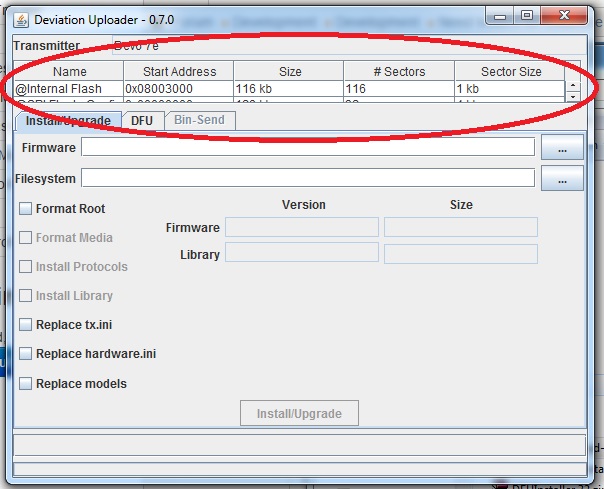
Replied by Durete on topic Need testers for USBcode
PhracturedBlue wrote: Try this one instead. It is just the 32bit exe, you need to copy the exe to the directory from the 1.0 zip file
Thanks PB. Now is working, but the driver installation is a little bit tricky. Sometimes works, sometimes don't.
After install Deviation USB driver, can't return to the old DFU driver with your utility. I need to replace Deviation driver reinstalling the Walkera DFU utility.
The java uploader works good. Only some minor graphic problems, probably related to my screen resolution, but not too bad.
For reference, tested with Devo 7e.
- stevecox
-
- Offline
- Keep swinging
01 Jun 2015 12:56 #33317
by stevecox
Adelaide
Replied by stevecox on topic Need testers for USBcode
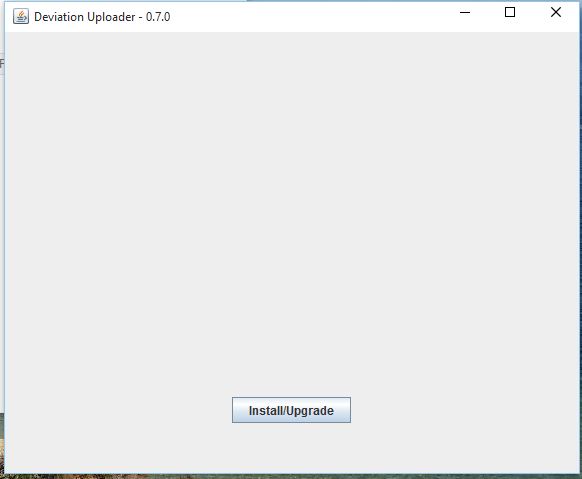
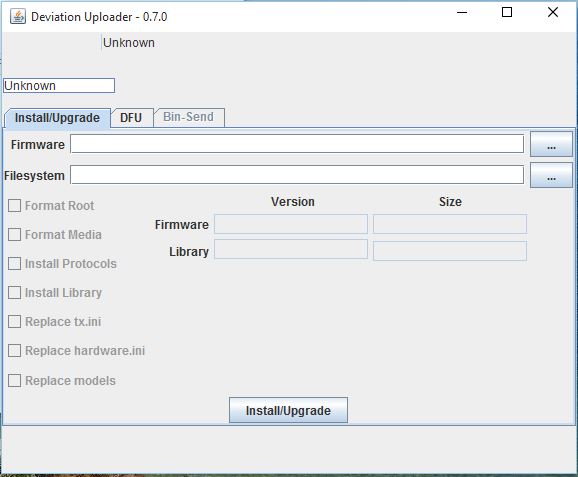
Ok was doing the driver install wrong, I got it to install now, and also tried the way above, it definitely seems to install. When running the java file then it comes up with an empty window. when I move my mouse around it it sort of uncovers sections but doesn't seem to work in any way or see the tx - switching tx on with ext pressed, both before starting the jar file and if I try after opening the jar file same response. Some images attached of the window.
Adelaide
- PhracturedBlue
-
- Offline
Less
More
- Posts: 4403
01 Jun 2015 13:06 #33319
by PhracturedBlue
Replied by PhracturedBlue on topic Need testers for USBcode
It almost sounds like it is getting hung in the USB loop section which would prevent screen update. can you from a command-line run:
java -jar DeviationUpload-0.7.0.jar -l and see what it does. You can also try running without the -l (which should give you the GUI). You may get back-trace messages to the screen.
I finished downloading the Windows 10 Preview ISO. I will install it in a VM when I get a chance.
java -jar DeviationUpload-0.7.0.jar -l and see what it does. You can also try running without the -l (which should give you the GUI). You may get back-trace messages to the screen.
I finished downloading the Windows 10 Preview ISO. I will install it in a VM when I get a chance.
- stevecox
-
- Offline
- Keep swinging
01 Jun 2015 21:52 #33341
by stevecox
Adelaide
Replied by stevecox on topic Need testers for USBcode
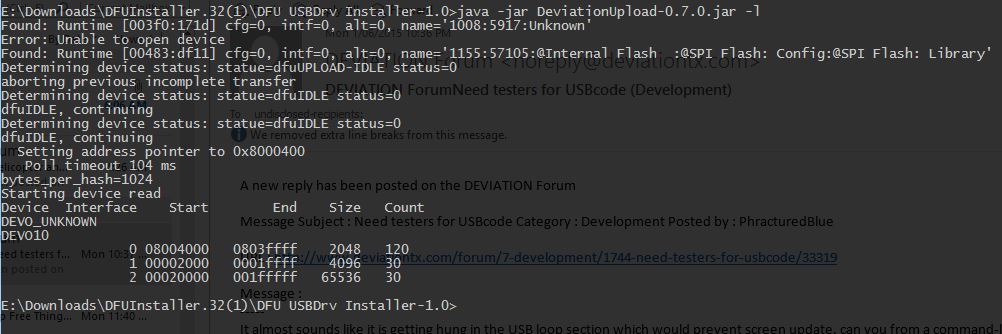
See attached from usbdview, seems it's installed however the status as such does not change if i turn the tx on into program mode or not. also the output from command line with the tx on and in program mode.
Adelaide

- PhracturedBlue
-
- Offline
Less
More
- Posts: 4403
01 Jun 2015 23:43 #33344
by PhracturedBlue
Replied by PhracturedBlue on topic Need testers for USBcode
USBDview just sows which drivers are installed, not which devices are available. The log shows that it can find your device though there is something fishy since you shouldn't see that DEVO_UNKNOWN line. if you run thecmd with the tx off what does it show? Do you still see the 'DEVO_UNKNOWN'?
Did you try without '-l' to see if there are any errors?
It kind of looks like 2 different transmitters are being detected (the DEVO_UNKNOWN and the DEVO10), and the 1st one is being selected (which will probably break everything.
You could also try USBView (search google) to see what USB devices are plugged in
Did you try without '-l' to see if there are any errors?
It kind of looks like 2 different transmitters are being detected (the DEVO_UNKNOWN and the DEVO10), and the 1st one is being selected (which will probably break everything.
You could also try USBView (search google) to see what USB devices are plugged in
- stevecox
-
- Offline
- Keep swinging
02 Jun 2015 12:55 #33359
by stevecox
Adelaide
Replied by stevecox on topic Need testers for USBcode
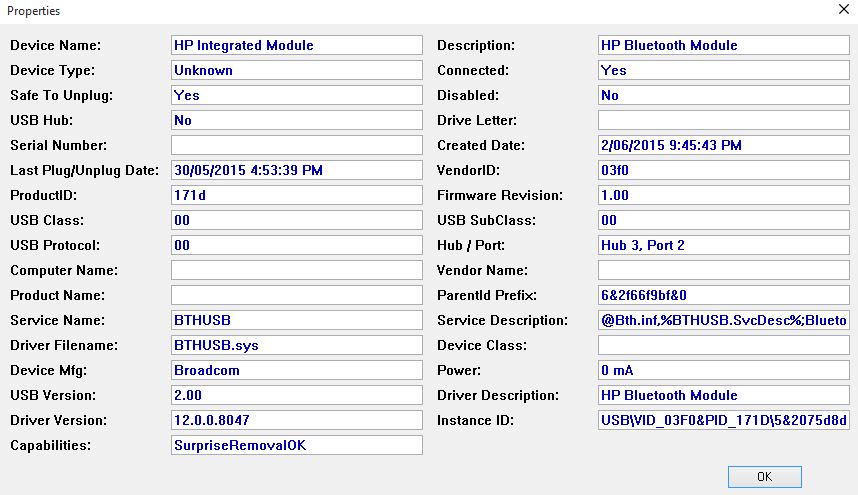
Yep probably what's stopping it. From a clean boot running the command I get the following without having connected any tx, purely just a wireless keyboard/mouse combo in one usb the rest of the usb's have nothing. I get this with or without the keyboard/mouse usb dongle plugged in.
<snip>
E:\Downloads\DFUInstaller.32(1)\DFU USBDrv Installer-1.0>java -jar DeviationUpload-0.7.0.jar -l
Found: Runtime [003f0:171d] cfg=0, intf=0, alt=0, name='1008:5917:Unknown'
Error: Unable to open device
Device Interface Start End Size Count
DEVO_UNKNOWN
</snip>
It looks like that is the bluetooth, this is on a HP laptop btw - attached
<snip>
E:\Downloads\DFUInstaller.32(1)\DFU USBDrv Installer-1.0>java -jar DeviationUpload-0.7.0.jar -l
Found: Runtime [003f0:171d] cfg=0, intf=0, alt=0, name='1008:5917:Unknown'
Error: Unable to open device
Device Interface Start End Size Count
DEVO_UNKNOWN
</snip>
It looks like that is the bluetooth, this is on a HP laptop btw - attached
Adelaide
- PhracturedBlue
-
- Offline
Less
More
- Posts: 4403
02 Jun 2015 14:09 #33363
by PhracturedBlue
Replied by PhracturedBlue on topic Need testers for USBcode
that is weird. Only devices registered with libusb should have shown up I think.
I'll fix it to ignore everything but DFU devices
I'll fix it to ignore everything but DFU devices
- repli
-
- Offline

Less
More
- Posts: 6
29 Jun 2015 17:50 #34849
by repli
Replied by repli on topic Need testers for USBcode
exact same situation here (Win 8.1 x64)
- Condor
-
- Offline

Less
More
- Posts: 17
29 Jun 2015 22:54 #34862
by Condor
Replied by Condor on topic Need testers for USBcode
I can't get this Software to work with XP Pro.
How do I install driver with zadig_xp_2.1.2. Because DeviationUpload-0.7.0 does not detect my Devo 10 .
I need to get this working as I need to upgrade.
Thanks for all your hard work on this project.
How do I install driver with zadig_xp_2.1.2. Because DeviationUpload-0.7.0 does not detect my Devo 10 .
I need to get this working as I need to upgrade.
Thanks for all your hard work on this project.
- PhracturedBlue
-
- Offline
Less
More
- Posts: 4403
29 Jun 2015 23:56 #34866
by PhracturedBlue
Replied by PhracturedBlue on topic Need testers for USBcode
Except for the DevoF12E, there is no good reason to use the DeviationUploader yet. You should grab Walkera's official downloader and use that. For various reasons, that is not possible for the F12E (at least when installing Deviation) so the only solution is the DeviationUploader. As I noted, I will look into the issue flagged.
- PhracturedBlue
-
- Offline
Less
More
- Posts: 4403
04 Jul 2015 13:31 - 04 Jul 2015 13:32 #35096
by PhracturedBlue
Replied by PhracturedBlue on topic Need testers for USBcode
I have released version 1.1 of the USB Driver installer. This one no longer supports XP, but it also no longer uses zadig (instead I use zadic which is a command-line version) so it is much more reliable. There is also a single version for both 32Bit and 64bit. tested on Win7,8.1, and 10(preview)
My next task will be to fix up the uploader itself
My next task will be to fix up the uploader itself
Last edit: 04 Jul 2015 13:32 by PhracturedBlue.
- stevecox
-
- Offline
- Keep swinging
04 Jul 2015 22:51 #35117
by stevecox
Adelaide
Replied by stevecox on topic Need testers for USBcode
I ran the new tool, firstly uninstalling everything option then an install of the deviation dfu. Before plugging in the tx I ran the jar file and it loaded up fully - just for a look see. I then closed this window, plugged the tx in and did a backup of the tx filesystem to my hdd. Then switched tx off. Went to run the .jar file again and tried to run it and no-go, same as before, doesn't seem to load up fully/properly. I repeated the steps above, with a reboot between uninstalling the driver and still no-go. Tried putting tx on before running the jar file and no good. Could a different driver have installed/overwritten the deviation one on the fly when I plugged the tx in and simply copied the filesystem to my hdd as a backup - at that point the new deviation driver had already been installed beforehand when I did this. It may help, I have attached a report of usbdview whilst the devo8 is plugged in in dfu mode. Gimme some idea's to try & I will have a go.
Adelaide
Time to create page: 0.185 seconds
-
Home

-
Forum
-
Development
-
Development
- Need testers for USBcode