
GUI
- FDR
-
- Offline

Less
More
27 Jun 2012 13:15 #426
by FDR
Replied by FDR on topic Re: GUI
Thanks, it is working now...
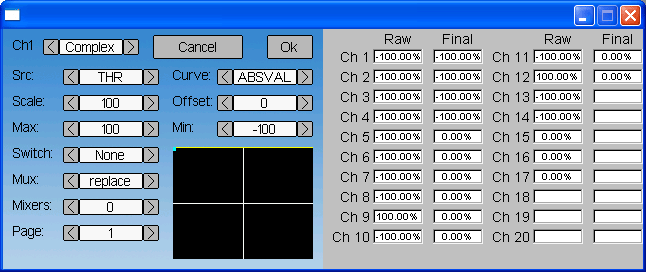
Other question: Is there any reason why most of the channels default to -100%, but the throttle defaults to +100%? Of course I see that it is only in the emulator, since in the transmitter it gets the actual readings from the sticks...
Other question: Is there any reason why most of the channels default to -100%, but the throttle defaults to +100%? Of course I see that it is only in the emulator, since in the transmitter it gets the actual readings from the sticks...
- PhracturedBlue
-
- Offline

Less
More
- Posts: 4403
27 Jun 2012 13:29 #428
by PhracturedBlue
Replied by PhracturedBlue on topic Re: GUI
Because that is how the hardware works. the devo8 is at 100% (raw value) when the throttle is all the way off, which is different than the other channels. i need to model it that way in the simulator so that I make sure to get the reversing right.
- FDR
-
- Offline
- PhracturedBlue
-
- Offline
Less
More
- Posts: 4403
27 Jun 2012 14:12 #430
by PhracturedBlue
Replied by PhracturedBlue on topic Re: GUI
In my firmware, the value is treated as a signed int until it is sent to the radio at which time I format it properly. I assume the Devo firmware works the same way, since it would be a real pain to do the necessary math and mixing if you stored the value as unsigned + sign bit and would bring no value.
If you are wondering how the 'reverse' button is applied, it is applied at the very end before transmitting to the transmitter. When I'm done it won't be needed for the throttle, since we want to invert the throttle value in the firmware (i.e. hide the fact that it is inverted in hardware from the user). I just didn't want to forget, so I made the simulator match the devo8 raw input.
If you are wondering how the 'reverse' button is applied, it is applied at the very end before transmitting to the transmitter. When I'm done it won't be needed for the throttle, since we want to invert the throttle value in the firmware (i.e. hide the fact that it is inverted in hardware from the user). I just didn't want to forget, so I made the simulator match the devo8 raw input.
- PhracturedBlue
-
- Offline
Less
More
- Posts: 4403
08 Jul 2012 03:36 #436
by PhracturedBlue
Replied by PhracturedBlue on topic Re: GUI
FYI: I recently implemented a keyboard (modeled after the iphone keyboard). It has text and numeric modes. It isn't actually available via any menus yet, but once I add the ability to select and edit models, it will be accessible.
- PhracturedBlue
-
- Offline
Less
More
- Posts: 4403
09 Jul 2012 15:19 #441
by PhracturedBlue
Replied by PhracturedBlue on topic Re: GUI
Give the latest code a try.
There is a new page (3rd to the right) for editing model data.
It includes the new keyboard entry (for changing the model name) and the load/save dialog for switching models.
You cannot create new models with the code, but it will show whichever models you have (must be named 'model#.ini' where # is between 1 and 100. It reads the model name from the file and model names can be up to 24 characters
It isn't particularly pretty, but it should get the job done.
Note that the load/save don't actually work yet, but that will be in the next commit.
There is a new page (3rd to the right) for editing model data.
It includes the new keyboard entry (for changing the model name) and the load/save dialog for switching models.
You cannot create new models with the code, but it will show whichever models you have (must be named 'model#.ini' where # is between 1 and 100. It reads the model name from the file and model names can be up to 24 characters
It isn't particularly pretty, but it should get the job done.
Note that the load/save don't actually work yet, but that will be in the next commit.
- FDR
-
- Offline
09 Jul 2012 15:50 #442
by FDR
Replied by FDR on topic Re: GUI
Wow! Nice!
A few comments:
1. While the name could be 24 chars length, the input only allows 20
2. I missed the cursor, but then I realized, that it is always at the end, and the DEL is rather a backspace
3. The CAPS is a bit confusing too, because it really is a shift, not a caps lock. It would be nice, if the letters on the buttons would reflect the caps state!
4. When called from a numeric only field, the numeric keyboard shouldn't allow to input letters and symbols other than sign and decimal, when they are allowed, and it doesn't handle min/max limits either.
Don't get me wrong, I really like it, it's just can be refined further...
A few comments:
1. While the name could be 24 chars length, the input only allows 20
2. I missed the cursor, but then I realized, that it is always at the end, and the DEL is rather a backspace
3. The CAPS is a bit confusing too, because it really is a shift, not a caps lock. It would be nice, if the letters on the buttons would reflect the caps state!
4. When called from a numeric only field, the numeric keyboard shouldn't allow to input letters and symbols other than sign and decimal, when they are allowed, and it doesn't handle min/max limits either.
Don't get me wrong, I really like it, it's just can be refined further...
- FDR
-
- Offline
09 Jul 2012 15:57 #443
by FDR
Replied by FDR on topic Re: GUI
...continued:
The scroll on the listbox works strange.
It works backwards, and can loose selection...
Other than that, there are some cosmetics, like Watt should be uppercase (10mW), and IMO the protocol names too...
By the way, what is the purpose of the "none" protocol?
May be it disables the transmission and only outputs PPM on the trainer port?
The scroll on the listbox works strange.
It works backwards, and can loose selection...
Other than that, there are some cosmetics, like Watt should be uppercase (10mW), and IMO the protocol names too...
By the way, what is the purpose of the "none" protocol?
May be it disables the transmission and only outputs PPM on the trainer port?
- PhracturedBlue
-
- Offline
Less
More
- Posts: 4403
09 Jul 2012 16:09 #444
by PhracturedBlue
Replied by PhracturedBlue on topic Re: GUI
The cosmetic stuff is easy. I am sharing the same strings between the ini write and the entry gui, and initially I typed them all in lower-case. they don't take up any more space to be UC though, so it is an easy fix
I'll play with the listbox some-more. Scrolling was wokring when I tested it initially. I haven't played with it much now that it is actually connected to the model list though.
The 'None' protocol is mostly for my testing so I don't have interrupts firing when I'm trying to do debug. I dunno if it'll ever be useful for anything else, but it does no harm being there.
I considered making the keyboard case sensitive. It is pretty easy to do.
Fixing the number pad to work properly is more work. I'll get there eventually.
I'm not yet sure what the appropriate name length is. Probably whatever will fit in the relevant dialogs. But I should make it consistent.
Thanks for the thorough testing!
I'll play with the listbox some-more. Scrolling was wokring when I tested it initially. I haven't played with it much now that it is actually connected to the model list though.
The 'None' protocol is mostly for my testing so I don't have interrupts firing when I'm trying to do debug. I dunno if it'll ever be useful for anything else, but it does no harm being there.
I considered making the keyboard case sensitive. It is pretty easy to do.
Fixing the number pad to work properly is more work. I'll get there eventually.
I'm not yet sure what the appropriate name length is. Probably whatever will fit in the relevant dialogs. But I should make it consistent.
Thanks for the thorough testing!
- FDR
-
- Offline
09 Jul 2012 18:03 #445
by FDR
Replied by FDR on topic Re: GUI
Oh, it was not thorough at all, but only initial impressions...
The length of the model name is not critical, but the 8 characters of the original fw is ridicuolus, because they themselves have longer type names...
Other complaint about the listbox is the color scheme it uses.
Black text is hard to see on the dark grey selection background.
Visibility was the main reason we started to hack the DEVO libraries!
Will the color scheme be configurable?
The length of the model name is not critical, but the 8 characters of the original fw is ridicuolus, because they themselves have longer type names...
Other complaint about the listbox is the color scheme it uses.
Black text is hard to see on the dark grey selection background.
Visibility was the main reason we started to hack the DEVO libraries!
Will the color scheme be configurable?
- PhracturedBlue
-
- Offline
Less
More
- Posts: 4403
09 Jul 2012 18:58 #446
by PhracturedBlue
Replied by PhracturedBlue on topic Re: GUI
I've been trying to figure out how to manage the color scheme. Using large bitmaps quickly eats up flash space that we want for model info. That is why the keyboard is rendered rather than drawn. For the listbox, it is currently rendered because it is more flexible that way, but we could use bitmaps for the text items I suppose.
In any case, my thought is to use another ini file to store all color settings (foreground, and background) as well as font and font-size for each gui object type so that it is fully customizable. I still need to figure out how to do that while still allowing potentially multiple colors to be used for a given widget depending on context, but I don't expect it to be too hard to do.
For the moment at least I've decided against a fully dynamic gui definition where the placement and size of GUI objects is also configurable.
In any case, my thought is to use another ini file to store all color settings (foreground, and background) as well as font and font-size for each gui object type so that it is fully customizable. I still need to figure out how to do that while still allowing potentially multiple colors to be used for a given widget depending on context, but I don't expect it to be too hard to do.
For the moment at least I've decided against a fully dynamic gui definition where the placement and size of GUI objects is also configurable.
- FDR
-
- Offline
09 Jul 2012 19:37 #447
by FDR
Replied by FDR on topic Re: GUI
I think it is unavoidable to use both rendered and fix bitmap part for the GUI elements. I didn't mean fully dynamic, because while it is not that hard to define the size and position, but it would be difficult to define the touch sensitive parts, and assign functionality to them.
Background images can be smaller if they are one pixel wide and are scaled up when used (like most web design do), but that would limit the possible look.
On configurable I mean all the fore and background colors should be definable, as well as the fixed size bitmaps it uses for the controls for example.
An example is, that someone should be able to define an inverse scheme if he liked, or a high contrast or black and white one.
I have some ideas for customizable main screens, but even that wouldn't be fully dynamic (because it effectively means coding), but using predefined compositions with definable contents...
Background images can be smaller if they are one pixel wide and are scaled up when used (like most web design do), but that would limit the possible look.
On configurable I mean all the fore and background colors should be definable, as well as the fixed size bitmaps it uses for the controls for example.
An example is, that someone should be able to define an inverse scheme if he liked, or a high contrast or black and white one.
I have some ideas for customizable main screens, but even that wouldn't be fully dynamic (because it effectively means coding), but using predefined compositions with definable contents...
- PhracturedBlue
-
- Offline
Less
More
- Posts: 4403
10 Jul 2012 01:15 #448
by PhracturedBlue
Replied by PhracturedBlue on topic Re: GUI
Can you explain? I tried it with 100 models, and it worked as I expect. selection is maintained as you scroll off the screen and then back. There is no position marker so you can't tell how many elements there are, nor can you page through them particularly quickly (I'll fix those eventually)FDR wrote: ...continued:
The scroll on the listbox works strange.
It works backwards, and can loose selection...
- FDR
-
- Offline
10 Jul 2012 04:44 #449
by FDR
Replied by FDR on topic Re: GUI
I have made some more model file to see how it works.
So the unusual thing was, that the arrows don't change the selection, but only scroll the list.
If I have a 3 element list it will look like this, if the second is selected:
1:Model1
2:Model1
3:Model1
Now if I click on the up arrow, nothing happens. It doesn't change selection to the first row.
But if I click on the down arrow, it starts to scroll out the list and introduce "NONE"-s instead of elements.
After 1 click:
2:Model1
3:Model1
NONE
Second click:
3:Model1
NONE
NONE
Is that the way it supposed to work?
IMO it should change selection in both direction, and if the selection reached the upper or lower bound of the list while there are more rows, then scroll the list by one.
Other interesting thing, that it scrolls out rows even when they can be shown all at once, and makes those NONE rows instead...
So the unusual thing was, that the arrows don't change the selection, but only scroll the list.
If I have a 3 element list it will look like this, if the second is selected:
1:Model1
2:Model1
3:Model1
Now if I click on the up arrow, nothing happens. It doesn't change selection to the first row.
But if I click on the down arrow, it starts to scroll out the list and introduce "NONE"-s instead of elements.
After 1 click:
2:Model1
3:Model1
NONE
Second click:
3:Model1
NONE
NONE
Is that the way it supposed to work?
IMO it should change selection in both direction, and if the selection reached the upper or lower bound of the list while there are more rows, then scroll the list by one.
Other interesting thing, that it scrolls out rows even when they can be shown all at once, and makes those NONE rows instead...
- PhracturedBlue
-
- Offline
Less
More
- Posts: 4403
10 Jul 2012 05:11 - 10 Jul 2012 05:15 #450
by PhracturedBlue
Replied by PhracturedBlue on topic Re: GUI
The arrows are supposed to act like a scrollbar. A scrollbar changes the display but not the selection. So the behavior you see is what I designed it to do.
If you created additional model#.ini files, they'll show up as 'NONE' if they don't contain a 'name=' field. You can't load a model from these (well you probably can, but shouldn't), but you can save to them.
EDIT: This will be more obvious when I finish the scrollbar implementation. there is no 'bar' in the scrollbar today, so it isn't obvious what the arrows are doing.
If you created additional model#.ini files, they'll show up as 'NONE' if they don't contain a 'name=' field. You can't load a model from these (well you probably can, but shouldn't), but you can save to them.
EDIT: This will be more obvious when I finish the scrollbar implementation. there is no 'bar' in the scrollbar today, so it isn't obvious what the arrows are doing.
Last edit: 10 Jul 2012 05:15 by PhracturedBlue.
- PhracturedBlue
-
- Offline
Less
More
- Posts: 4403
10 Jul 2012 05:14 #451
by PhracturedBlue
Replied by PhracturedBlue on topic Re: GUI
The latest commits fix many of the other issues you mentioned.
I also introduced images/config.ini that you can use to change some of the colors. namely the keyboard, listbox, and throttle-display are fully configurable, as are the default font and text color. It'll take some time to figure out where unique fonts/colors are needed, but this should give you an idea of the type of configuration I'm thinking of.
I also introduced images/config.ini that you can use to change some of the colors. namely the keyboard, listbox, and throttle-display are fully configurable, as are the default font and text color. It'll take some time to figure out where unique fonts/colors are needed, but this should give you an idea of the type of configuration I'm thinking of.
- PhracturedBlue
-
- Offline
Less
More
- Posts: 4403
- FDR
-
- Offline
10 Jul 2012 06:00 - 10 Jul 2012 06:00 #453
by FDR
EDIT: I will try the new one soon...
Replied by FDR on topic Re: GUI
No. All three has the name field. The nones simply appear in place of the scrolled out items.PhracturedBlue wrote: If you created additional model#.ini files, they'll show up as 'NONE' if they don't contain a 'name=' field. You can't load a model from these (well you probably can, but shouldn't), but you can save to them.
EDIT: I will try the new one soon...
Last edit: 10 Jul 2012 06:00 by FDR.
- FDR
-
- Offline
10 Jul 2012 07:53 #454
by FDR
Replied by FDR on topic Re: GUI
Now the trackbar makes it more clear, but my previous comment is still stands...
One more thing about the keyboard: could you implement the long click for the DEL button to speed up deleting a long text?
It doesn't needed for the others I think...
One more thing about the keyboard: could you implement the long click for the DEL button to speed up deleting a long text?
It doesn't needed for the others I think...
Time to create page: 1.488 seconds
